

Global JS Settings
HENGSHI SENSE provides a global JS setting feature, allowing users to customize the system to meet their personalized needs through custom JS code, such as using third-party statistical tools to monitor PV and UV on the system platform.
In addition to directly manipulating the DOM, the runtime also injects reusable hooks that are better suited for stable copy overrides and Data Agent capability extensions.
How to Choose the Right Option
For most users, the first problem is not how to write the code, but which capability to choose. Start with the table below:
| Requirement | Recommended option | Why | Typical cases |
|---|---|---|---|
| Hide buttons, tabs, or sections; adjust colors, fonts, spacing | Global CSS | This is a visual-only change. CSS is simpler and more stable. | Hide "Forgot password", hide the "Export" button, hide selected chart types |
| Replace fixed product copy, greetings, or prompts | window.customI18nPostProcessor() | It overrides copy by i18n key, so you do not need to poll the DOM. | Customize Copilot greetings, standardize button copy, replace prompt text |
| Change content after the page is rendered based on route or runtime state | Global JS | You need routing awareness, render timing, or runtime conditions. | Replace "no data" text, keep the browser tab title fixed, hide dropdown options on specific pages |
| Redirect after login/logout, load third-party scripts, listen to page events | Global JS | These requirements depend on browser events or external scripts, not CSS. | Redirect after logout, block the login page for SSO-only tenants, add analytics scripts |
| Let Data Agent access enterprise knowledge, internal APIs, or search services | window.heisenberg.createTool() | This extends Agent capabilities instead of changing page presentation. | Connect internal knowledge bases, call ticket APIs, query external search services |
Built-in Hooks
| Hook | Purpose | Description |
|---|---|---|
window.customI18nPostProcessor(value, key, options) | Override UI copy by i18n key | Called after the system resolves the i18n value. Return the original value for keys you do not want to change. |
window.heisenberg.createTool(tool) | Register custom tools for Data Agent | Write the code in System Settings → Global JS. After saving and refreshing, the tool is available in Data Agent Agent mode on the web. See Data Agent Debugging for full parameter details. |
Usage Scenarios
Scenario 1: Integrate Third-Party Scripts or Listen to Page Events
This category is for "run extra logic after the page opens", for example:
- Integrate Baidu Analytics, Google Analytics, or other tracking scripts.
- Redirect users to a corporate portal or a third-party page after logout.
- Listen to
hs_urlchange, resource requests, or browser history changes and trigger route-level actions.
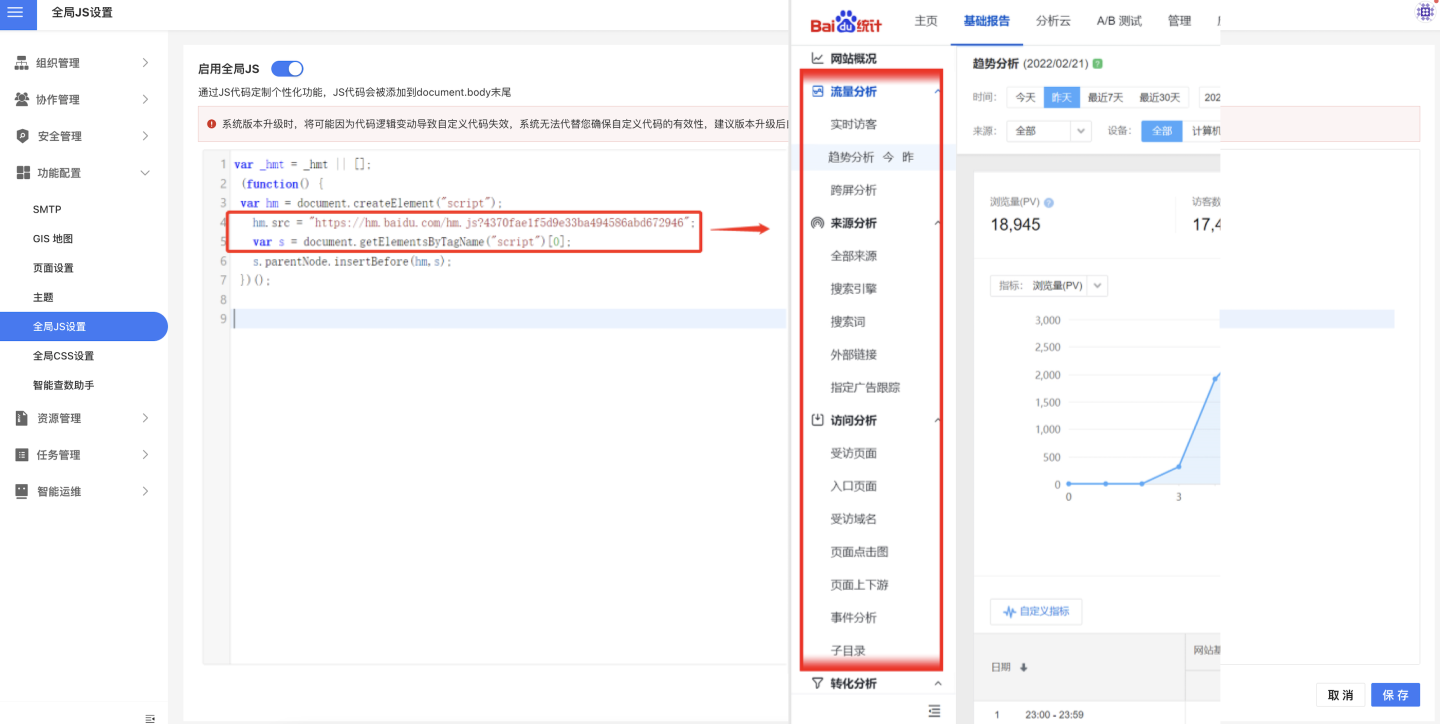
Example: integrating Baidu Analytics
Below is an example that uses JavaScript code to reference Baidu's website statistics to analyze the system. After enabling the JS feature, you can view the system's traffic analysis and website analysis data in the Baidu system.
Scenario 2: Modify Displayed Content After Rendering
This category is for cases where no built-in setting exists and the page must be adjusted after elements are rendered, for example:
- Replace the default "no data" text on a chart with business-specific wording.
- Keep the browser tab title fixed to the customer company name.
- Hide a specific dropdown option only on certain pages.
- Customize breadcrumb text or titles on legacy pages.
If you only need to change fixed copy, prefer window.customI18nPostProcessor in the next section. Direct DOM manipulation should be the fallback when no i18n key is available or when the page structure also matters.
In the following example, the no-data text of the chart in the system is replaced by custom JS code.
/**
 * Replace text
 */
var replaceTimer;
function replace(element, from, to) {
    const cont = element.textContent;
    if (cont) element.textContent = cont.replace(from, to);
};
function setTimer() {
  if (!window.location.pathname.includes('dashboard')) return;
  clearInterval(replaceTimer);
  replaceTimer = setInterval(function () {
    var elements = document.querySelectorAll('.hst__chart__no__data hr ~ span');
    var len = elements.length;
    console.log('In timer');
    while (len--) {
      replace(
        elements[len],
        new RegExp("Chart has no data that meets the conditions", "g"),
        "No data available",
      );
    }
  }, 300);
}
document.addEventListener('hs_urlchange', setTimer);
setTimer();Scenario 3: Customize UI Copy by i18n Key
If you only need to override a specific copy string, prefer window.customI18nPostProcessor. It is more stable and easier to maintain than polling the DOM, especially for non-technical teams that only need to adjust greetings or button copy.
window.customI18nPostProcessor = function (value, key, options) {
  if (key === 'copilot.recommend_more') {
    return 'Hello, I am the HENGSHI AI data assistant and can help you with data queries.';
  }
  return value;
};Typical needs:
- Customize Copilot / Data Agent greetings.
- Override built-in button labels, empty-state copy, or prompts.
- Apply tenant-level branding so each customer sees its own wording.
Recommendations:
- Return a new value only for the keys you want to override; otherwise return
value. - Confirm the key first through the browser developer tools or the existing language pack before writing logic.
- If the copy depends on the page structure or render timing, use global JS instead of forcing it into this hook.
Scenario 4: Register a Custom Tool for Data Agent
On the Data Agent tab of System Settings → Global JS, you can use window.heisenberg.createTool() to attach custom tools to the runtime agent. This is for capability extension, not page customization.
Typical needs include:
- Query internal knowledge bases, FAQs, or policy documents.
- Call internal HTTP APIs for business data such as inventory, orders, or ticket status.
- Integrate external search services or SaaS APIs as real-time information sources.
- Execute lightweight actions such as creating tickets, starting approvals, or writing back notes.
if (typeof window.heisenberg?.createTool === 'function') {
  window.heisenberg.createTool({
    name: 'hello_customer',
    description: 'Return a tenant-specific welcome message',
    parameters: window.heisenberg.zod.object({}),
    execute: async () => 'Hello from a custom tenant tool',
  });
}After saving and refreshing, the Data Agent can call this tool in Agent mode on the web. For enterprise knowledge bases, search engines, or internal HTTP APIs, continue with the full example in Data Agent Debugging.
If your requirement is only to change greetings, button labels, or hide a page element, you do not need createTool(). Those are copy or UI customization tasks and should use customI18nPostProcessor, global JS, or global CSS first.
Recover from Uncontrolled JS Code
The ability to customize JS code is very powerful, but it also comes with risks. If you encounter code errors or other JS-related issues while customizing JS code, it is highly likely that the system will become inaccessible.
To address this, we have provided the ability to recover from runaway JS code using URL parameters. You can visit https://{host}/setting/global-js?no-global-js=true to disable JS code and access the configuration page, allowing you to regain access to the system.