

Data Agent
Overview
In HENGSHI SENSE, the Data Agent—powered by large language models—helps users make the most of their data. Through a conversational interface, it can take you from ad-hoc analysis of business data to metric creation and Dashboard generation. We will keep embedding Agent capabilities throughout the product to boost the productivity of data analysts and data managers and to streamline workflows and complex tasks.
Installation and Configuration
Prerequisites
Please ensure the following steps are completed to bring Data Agent into an available state:
- Installation & Startup: Finish installing HENGSHI services by following the Installation & Startup Guide.
- AI Deployment: Install and deploy the related services according to the AI Deployment Documentation.
Configure Large Model
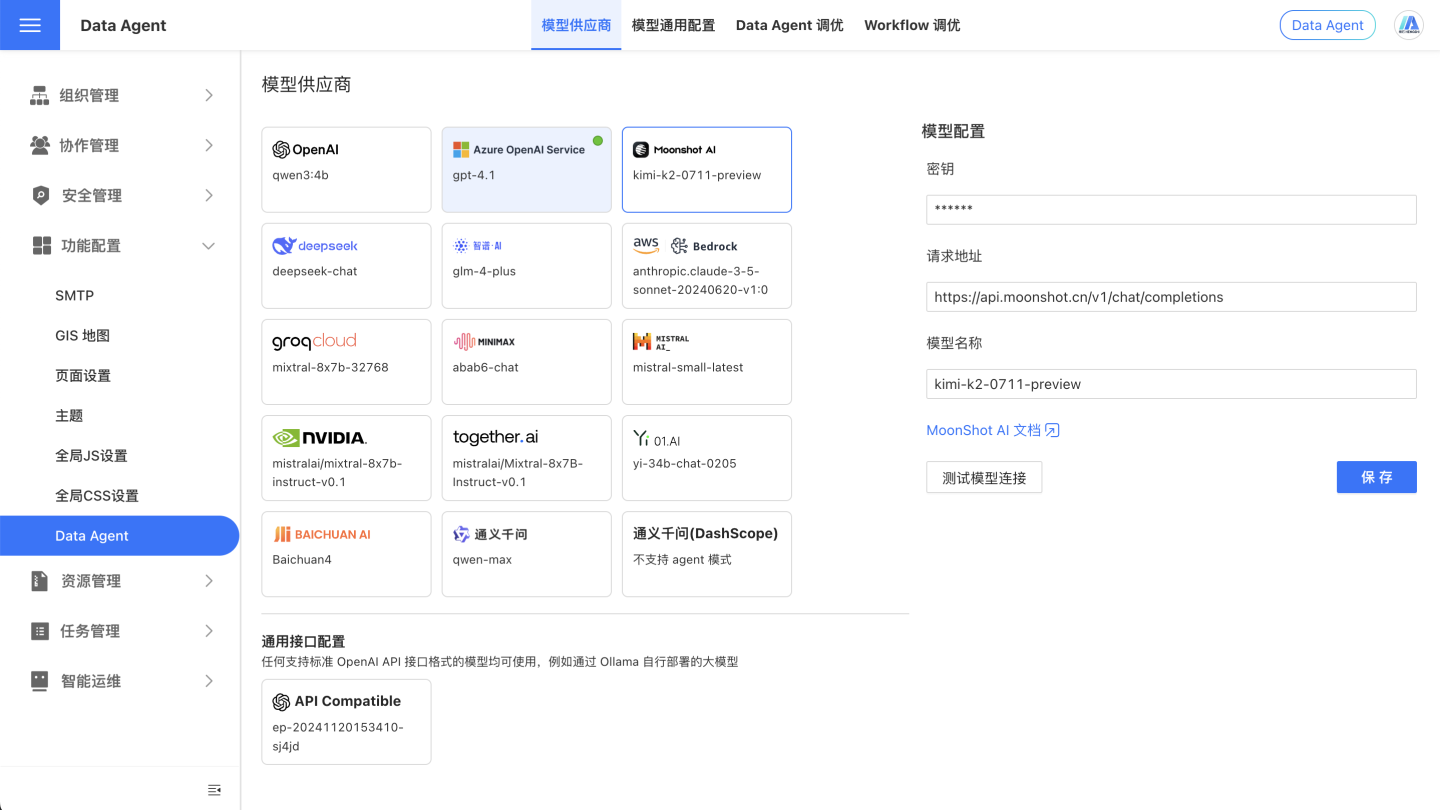
On the System Settings - Feature Configuration - Data Agent page, configure the relevant information.
User Guide
Before using Data Agent, you need to prepare the data so that the agent can grasp your unique business context, prioritize the correct information, and deliver consistent, reliable, and goal-aligned responses.
Preparing data for Data Agent is laying the foundation for a high-quality, down-to-earth, and context-aware experience. If the data is messy or ambiguous, Data Agent may struggle to understand accurately, producing results that are either superficial, factually off, or even misleading.
Invest time in solid data preparation, and Data Agent will truly internalize the business scenario, pinpoint key information, and provide answers that are not only stable and reliable but also tightly aligned with your objectives—letting Data Agent deliver real value.
Note
AI behavior is non-deterministic; even with identical input, AI does not always produce the exact same response.
Writing Prompts for AI
Industry Terms & Private Knowledge
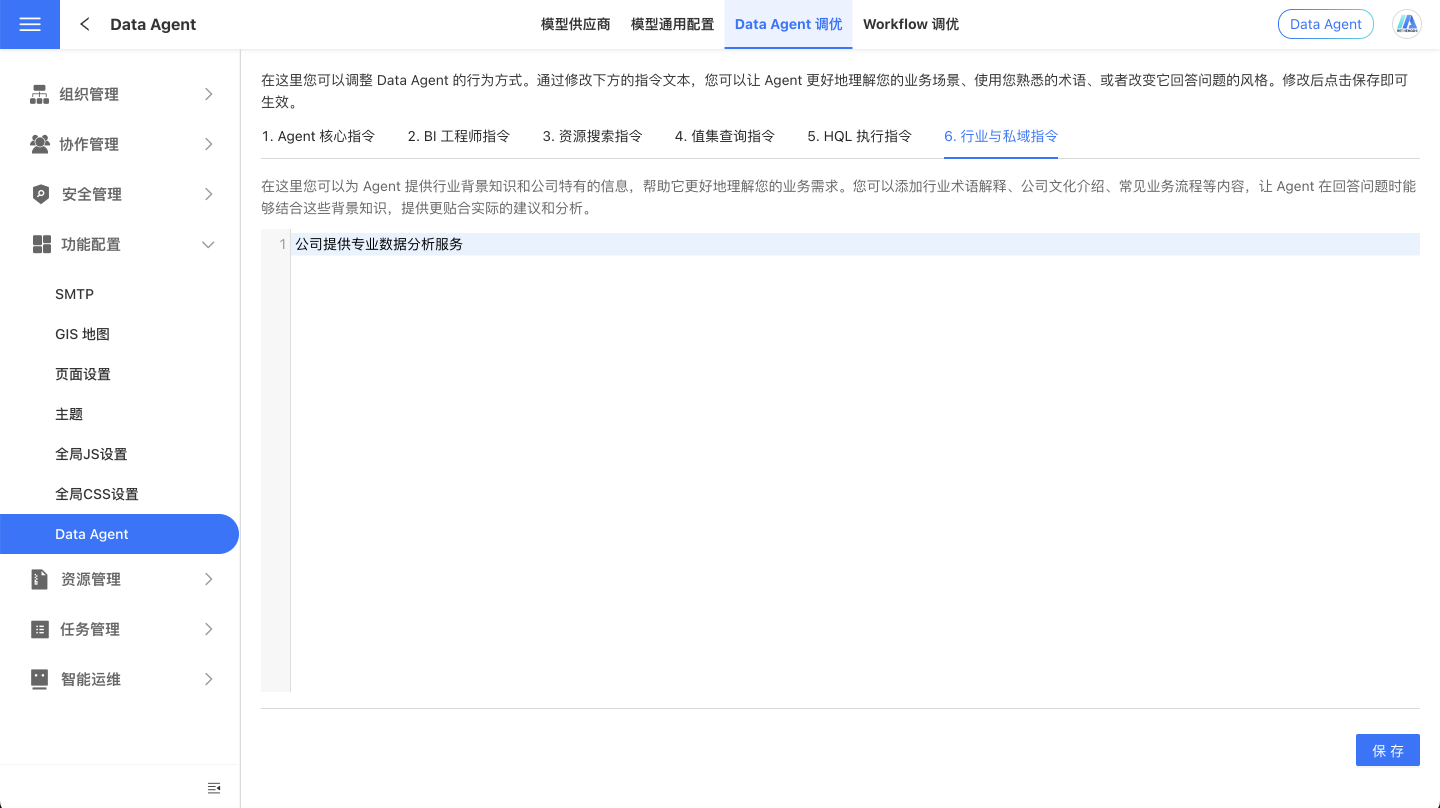
To unleash the full power of the large model, we provide a prompt-configuration feature in the Data Agent Console. Using natural language, you can feed the model—via the UserSystem Prompt—any background about your industry, business logic, analytical guidelines, or specific instructions. Data Agent will then leverage these directives to grasp your organization’s internal language, professional jargon, and analytical priorities, accurately interpreting domain-specific terminology and expectations to deliver higher-quality, more relevant answers.
Prompts help Data Agent respond in line with your industry, strategic goals, terminology, and operational logic, ensuring users receive more accurate and context-rich data insights. Examples:
- “大促” refers to the period from 10 Oct to 11 Nov each year.
- When users ask product-related questions, always retrieve both the product name and the product ID.
Dataset Analysis Rules
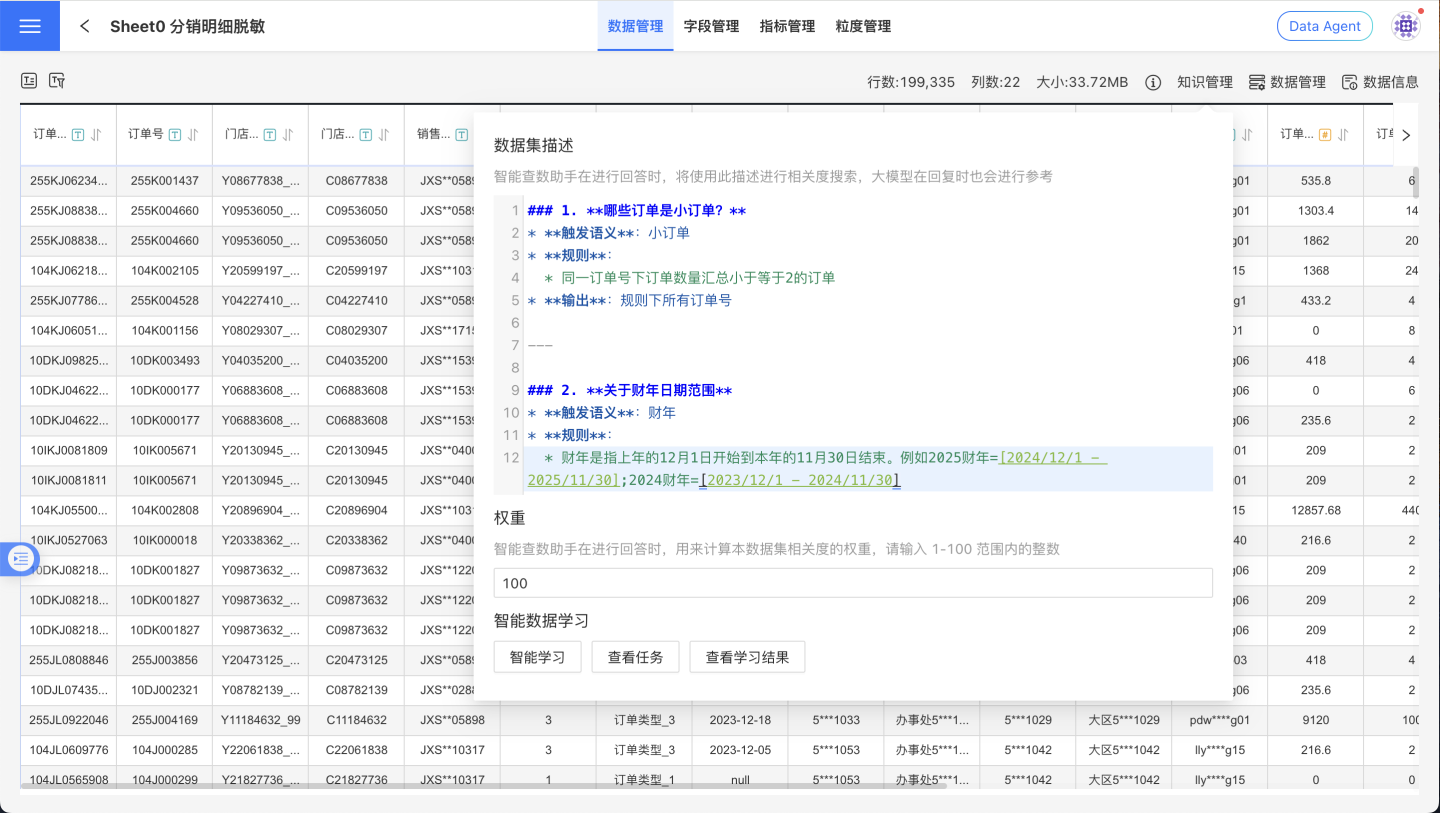
In the Dataset’s Knowledge Management, you can describe—in natural language—the Dataset’s purpose, implicit rules (such as filter conditions), synonyms, and the fields or metrics that correspond to proprietary business terms, guiding the Data Agent on how to perform certain types of analysis. For example:
- A “small order” is an order whose total quantity under the same order number is ≤ 2.
- A “fiscal year” runs from December 1 of the previous calendar year through November 30 of the current calendar year. For instance, FY 2025 spans 2024-12-01 to 2025-11-30, and FY 2024 spans 2023-12-01 to 2024-11-30.
- When asking about AAA, also list metrics BBB, CCC, DDD, etc.
Note
Understanding prompt-engineering best practices is essential. AI can be sensitive to the prompts it receives; the way a prompt is constructed affects AI comprehension and output. Effective prompts are:
- Clear and specific
- Use analogies and descriptive language
- Avoid ambiguity
- Structured by topic in markdown
- Break complex instructions into simple steps whenever possible
Preparing Data for AI
Data Vectorization
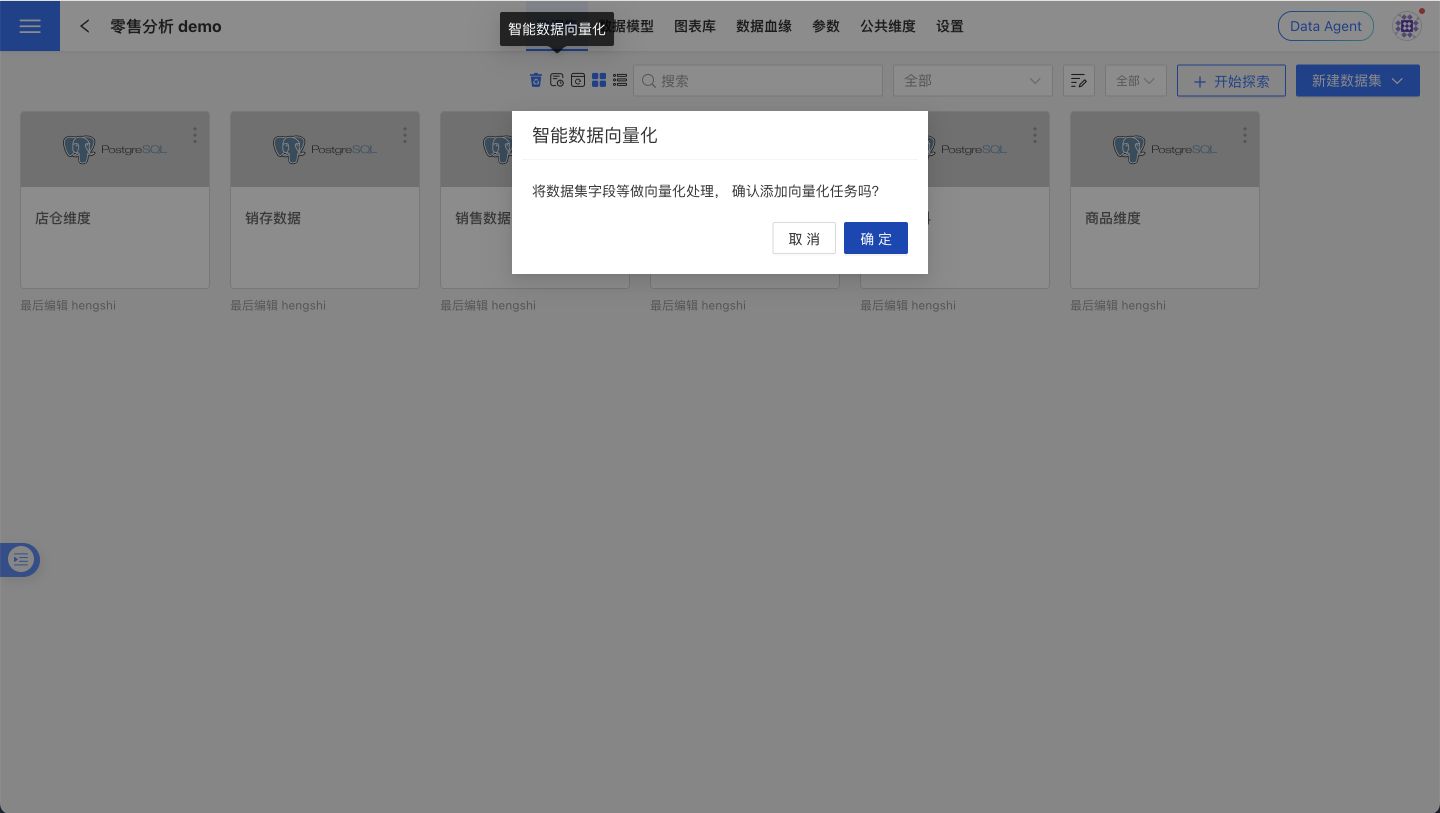
To locate the most relevant information within massive data assets faster and more accurately, we recommend “vectorizing” your data. Vectorization converts the names, descriptions, and field values of fields/atomic metrics into computable semantic vectors and writes them into a vector database, enabling the Data Agent to retrieve and recall based on semantics rather than keyword matching alone.
Benefits of vectorization:
- Higher relevance: understands synonyms, industry terminology, and context, reducing missed or false hits.
- Faster response: narrows the retrieval scope, lowering the cost of filling large-model context.
- Greater scalability: supports semantic associations and knowledge links across data packages and adapts to multilingual scenarios.
- Continuous improvement: works with “Smart Learning” tasks to refine Q&A quality based on human-reviewed results.
Steps:
- Go to the target Dataset page and click “Vectorize” in the action bar.
- Check progress under System Settings > Task Management > Execution Plans, and enable scheduled tasks as needed to stabilize and broaden recall coverage.
Note
The maximum number of distinct field values that can be vectorized is 100,000.
Data Management
Sound data management is the foundation for Data Agent to correctly understand business semantics and metric definitions. By enforcing consistent naming conventions, filling in field/metric descriptions, setting appropriate data types, and hiding or cleaning up irrelevant objects, you can significantly improve Q&A relevance and response speed, reduce LLM context costs, and minimize misunderstandings. We recommend running through the checklist below before publishing a data package and during routine maintenance; the results are even better when combined with “Data Vectorization” and “Smart Learning”.
- Dataset Naming: Keep dataset names concise and unambiguous so their purpose is immediately clear.
- Field Management: Keep field names short yet descriptive and avoid special characters. Explain each field’s purpose in detail under Field Description, e.g., “Use me as the default time axis”. Make sure the field type matches its intended use—fields that will be summed should be numeric, date fields should be of date type, etc.
- Metric Management: Keep atomic metric names concise and descriptive, avoiding special characters. Clarify each metric’s purpose in the Atomic Metric Description.
- Field Hiding: For fields that will not participate in Q&A, hide them to reduce the token count sent to the LLM, speed up responses, and lower costs.
- Distinguish Fields from Metrics: Ensure field and metric names are dissimilar to avoid confusion. Hide fields that do not need to answer questions; delete metrics that are no longer required.
- Smart Learning: Trigger a “Smart Learning” task to convert generic examples into dataset-specific ones. After the task completes, manually review the results, adding, deleting, or modifying as needed to enhance the assistant’s capabilities.
Enhancing Comprehension of Complex Calculations
Pre-establish reusable business definitions on the data side and expose them as Metrics; this yields higher accuracy, stability, and explainability in natural-language querying scenarios.
Best practices:
- Provide domain-wide, unified definitions for industry-specific metrics (e.g., financial risk control, ad placement, e-commerce conversion) and maintain synonym mappings in the Dataset’s Knowledge Management.
- Build a “business term → metric” mapping for easily confused concepts (e.g., “conversion rate”, “ROI”, “repurchase rate”) to prevent the model from freely combining fields.
- Prefer using a “metric” to carry the definition rather than ad-hoc calculation expressions in a single conversation; for critical metrics, create version and change logs to prevent definition drift.
Example (ROI):
- Ads / E-commerce: ROI = GMV ÷ Ad spend. In the metric description, clarify whether coupons are included, whether refunds and shipping fees are deducted, whether platform service fees are included, whether the statistical口径 is based on “payment time / order time”, and the time window (e.g., calendar day / week / month).
- Manufacturing / Projects: ROI = (Revenue − Cost) ÷ Cost, with the window being the full project lifecycle or financial period.
Use Cases
The agent-mode features of Data Agent are:
No restriction on conversation source
Based on the user’s input, Data Agent autonomously infers intent, decomposes the request, and—within the data the user is authorized to access—performs hybrid searches across the Data Mart, App Mart, and App Studio. It then queries the target data source and returns an answer.Complex-question decomposition
In addition to routine data queries, Data Agent accepts multiple questions in a single prompt, especially when later questions depend on earlier ones. It executes one or more data queries according to the complexity of the request.Context awareness
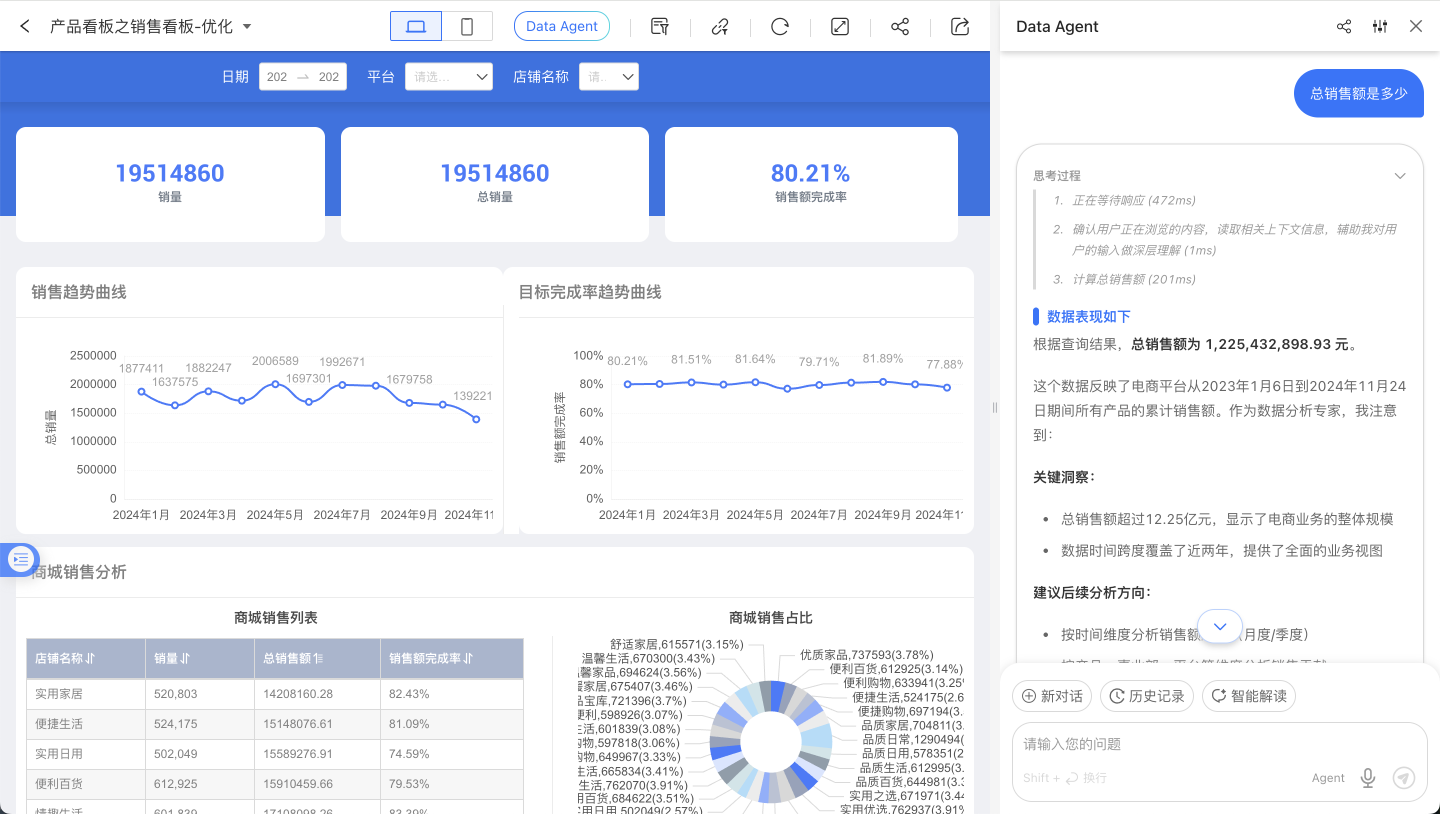
Data Agent reads the signed-in account’s profile, so it seamlessly resolves deictic references such as “my department.” It also reads the page the user is currently viewing; when the user is on a specific Data Package, Dataset, or Dashboard page, Agent bases its data queries and interactions directly on that page’s context.
With these capabilities, Data Agent can act as a visual-design assistant, a metric-creation assistant, or an analyst’s copilot—among other roles.
Intelligent Q&A
After upgrading Data Agent, Intelligent Q&A is no longer restricted to a limited data scope, eliminating the need to manually select a range before querying. This means the agent’s tasks now include content discovery, ad-hoc analysis, and insight generation.
Voice Input (Chrome / WeCom / Feishu)
Voice input inside the ChatBI / Data Agent page is a different capability from the Feishu / WeCom bot integrations. The bot documents describe how to answer questions inside IM channels. If your goal is to display the microphone button inside the page and let users speak directly there, verify the page runtime environment and authentication configuration first.
| Runtime environment | Required conditions | Notes |
|---|---|---|
| Chrome / Chromium browser | The browser exposes SpeechRecognition or webkitSpeechRecognition, and microphone access is allowed for the current page | Uses the Web Speech API SpeechRecognition / webkitSpeechRecognition. In common Chrome deployments this typically depends on Google’s online speech service rather than fully offline recognition. See MDN SpeechRecognition |
| WeCom container | WeCom authentication is configured; the page is opened inside WeCom; WeCom JS-SDK initialization for startRecord, stopRecord, and translateVoice succeeds | Depends on WeCom authentication and JS-SDK capability, not on bot configuration. In-page voice-to-text uses the WeCom JS-SDK voice APIs. See the official WeCom documentation |
| Feishu container | Feishu authentication is configured; the page is opened inside Feishu; the Feishu H5 SDK initializes successfully; scope.record authorization succeeds; the server can complete Feishu speech-to-text processing | The page records audio, and the server converts it through Feishu’s speech-to-text file recognition API. See the Feishu speech_to_text-v1/file_recognize documentation |
How to use it:
- Click the microphone button on the right side of the input area to switch into voice mode.
- Press and hold the input area while speaking. When you release it, the recognized text is written back into the input box.
- Review the text and then send the question.
The page hides the voice-input entry directly in the following cases:
- The current browser does not provide speech-recognition capability.
- WeCom / Feishu authentication is not configured correctly, so the page cannot finish JS-SDK initialization.
- The Feishu page does not obtain
scope.recordrecording permission. - Browser speech recognition reports a fatal error, such as unavailable microphone hardware or denied recording permission.
Version note
This section describes the entry-visibility behavior in the current and later versions. In earlier versions, the voice button could still appear after Feishu / WeCom initialization had already failed.
Tip
If your goal is to talk to a bot directly inside WeCom, Feishu, or DingTalk, see Data Q&A Bot, Feishu Data Q&A Bot, and WeCom Data Q&A Bot. Those documents do not govern in-page voice-input configuration.
Visual Creation
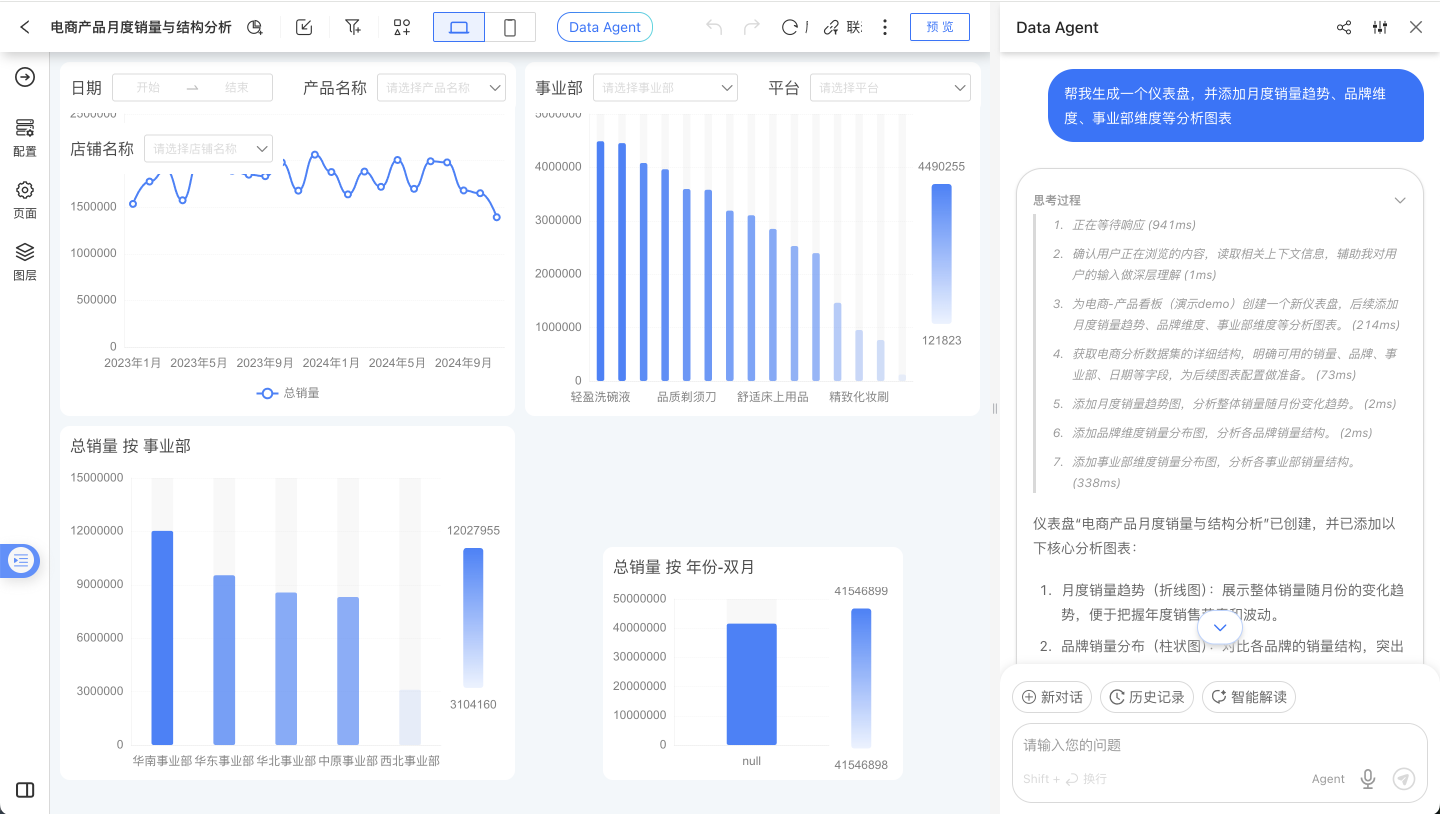
Data Agent can start from scratch to create a Dashboard on the Dashboard list page according to user needs, or directly edit an existing Dashboard—whether it’s creating Charts, adding filters, analyzing data to add rich-text reports, or adjusting the Dashboard layout, colors, and performing bulk operations on controls.
Smart Insights
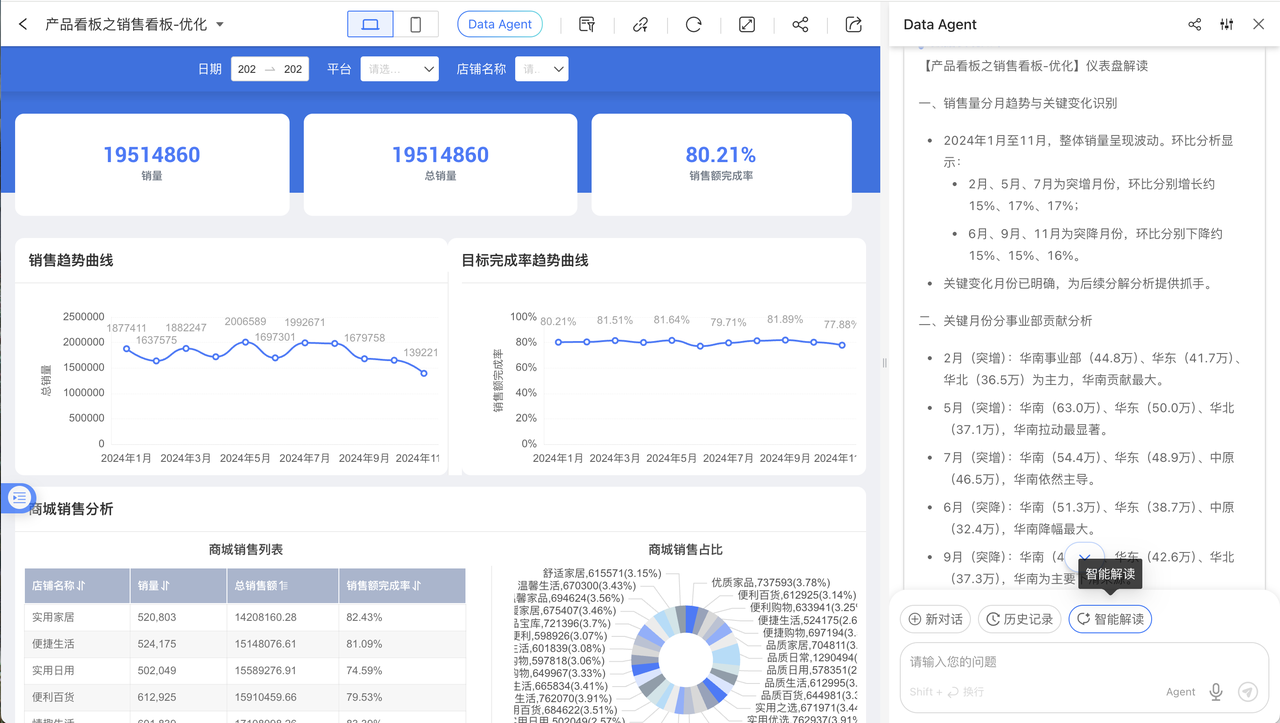
To help business users perform data analysis, periodic reviews, and data interpretation with Data Agent, we have added a “Smart Insights” configuration and a quick-action button. While viewing a Dashboard, the Data Agent panel displays a “Smart Insights” button; clicking it lets Data Agent follow a pre-configured interpretation path to query data in real time, detect anomalies, break down metrics, and drill down, finally delivering an insight report.
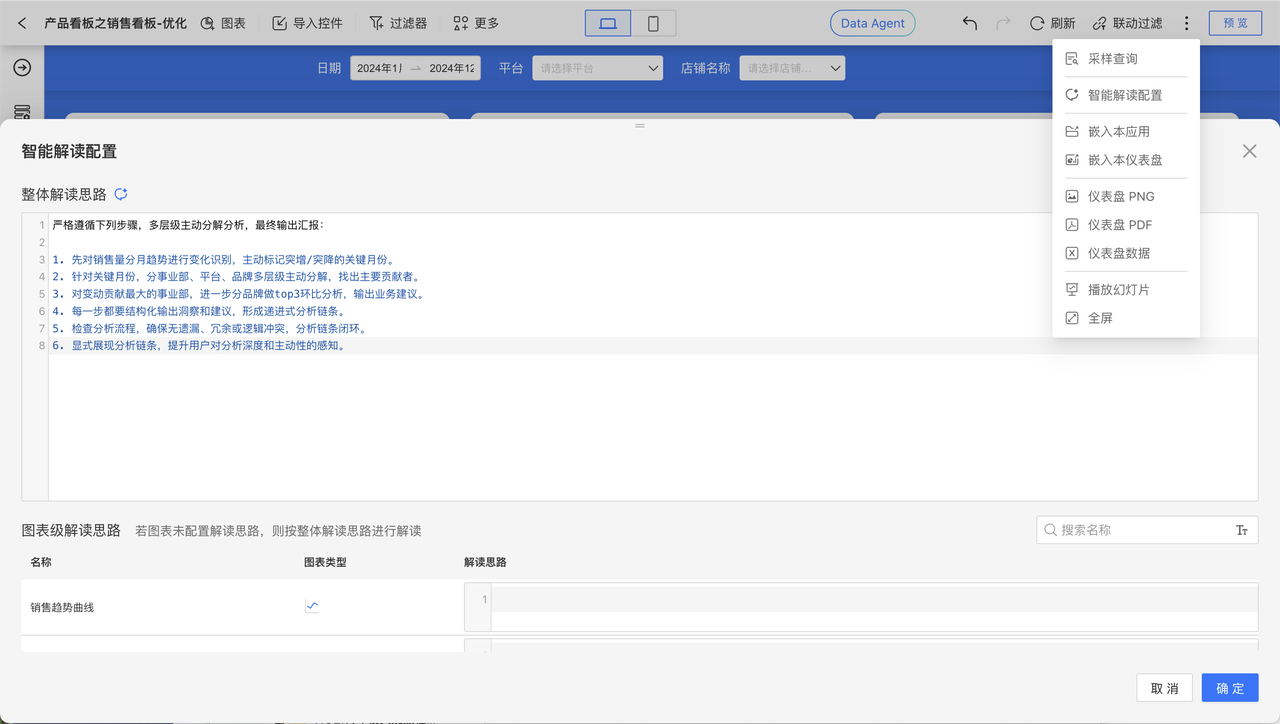
In Dashboard edit mode, open the drop-down menu in the upper-right corner and select “Smart Insights Configuration.” Users can define a fixed interpretation path tailored to their business needs, or click a button to let AI analyze the Dashboard structure and data to generate an interpretation template. Individual charts on the Dashboard also support separate insight paths; click the “Smart Insights” button in the upper-right corner of any chart widget to launch Data Agent and send the interpretation command.
Powered by AI, Smart Insights automatically analyzes the user-specified data range. Its core capabilities and boundaries are:
- Data Query & Extraction: Quickly locate and retrieve relevant information from data sources based on user commands or built-in analysis paths.
- Data Summarization & Synthesis: Integrate, aggregate, and condense query results across multiple dimensions to surface key facts, patterns, and current status.
- Descriptive Report Generation: Output findings as structured reports or concise textual summaries that explain “what happened in the past” and “what the current situation is.”
Note that Smart Insights does not perform predictive inference; it strictly analyzes existing and historical data, producing descriptions and summaries of established facts. It cannot forecast future trends, business outcomes, or any probabilistic events that have not yet occurred.
Note
Complex reports and complex tables are not supported by Smart Insights
Expression Writing
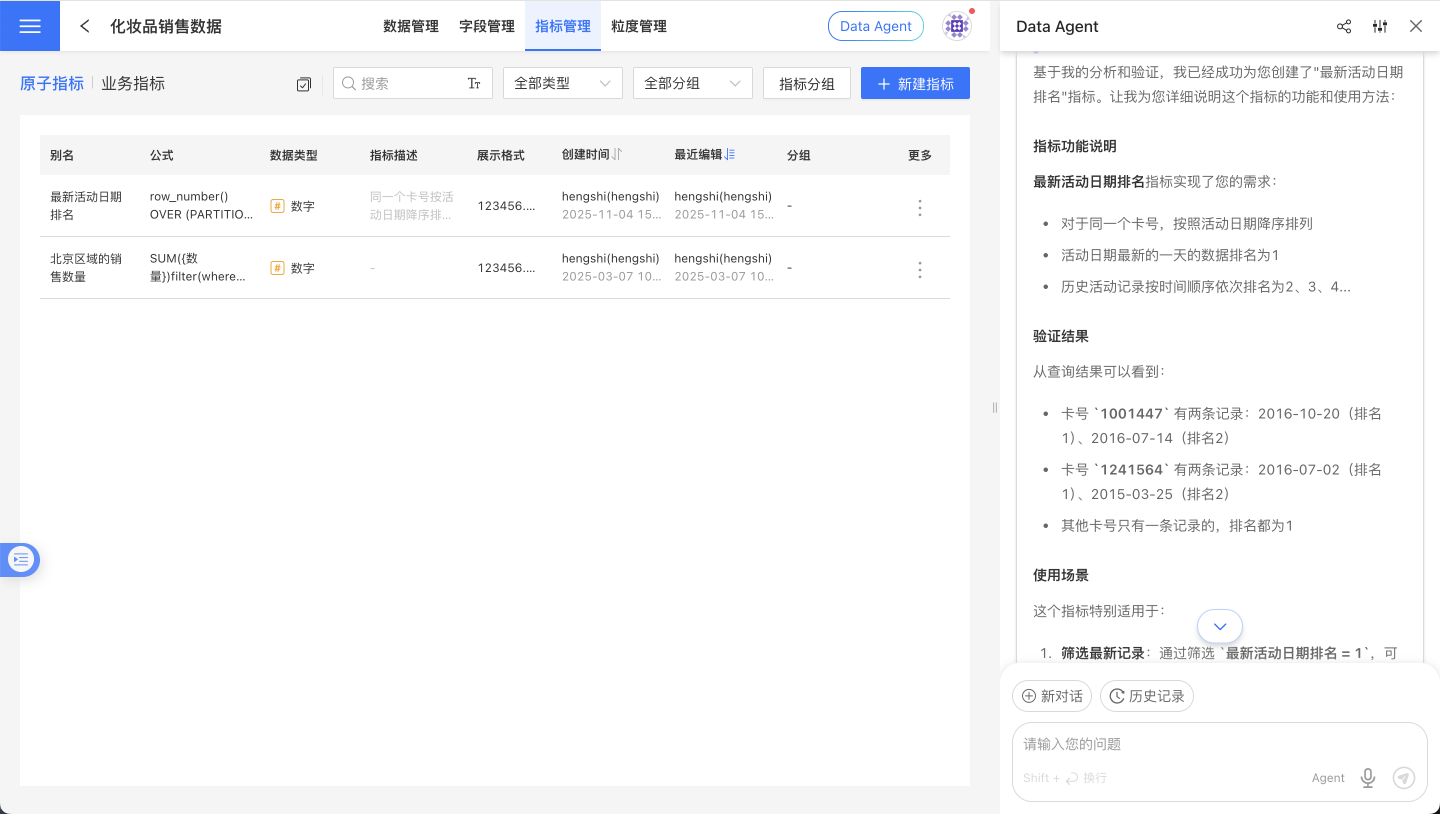
Data Agent, grounded in its understanding of HQL, assists users in crafting complex expressions and creating metrics.
Debugging & Tuning
Agent and Workflow support different prompt instructions for effect tuning; refer to the specific documents Agent Tuning and Workflow Tuning.
Integrating ChatBI
Data Agent does not expose just one integration artifact. It exposes multiple layers of capability:
- Data Q&A capability
- Result rendering capability
- Full page capability
If you have not yet decided between iframe, JS SDK, and API, read Data Agent Integration Overview first.
The most important question here is not “which path is more advanced”, but: how much of the experience do you want to keep in your own system, and where do you want HENGSHI to take over?
Quick-Selection Guide
| Scenario | Recommended Approach | Development Effort |
|---|---|---|
| Rapid integration, no UI customization | iframe Integration | ⭐ Minimal |
| Custom UI & enhanced interaction | SDK Integration | ⭐⭐⭐ |
| Integration with third-party apps | API Integration | ⭐⭐⭐⭐ |
| Integration in enterprise chat tools | Data Q&A Bot | ⭐⭐ |
Start here
If you are still figuring out what HENGSHI provides versus what your own system should keep, start with Data Agent Integration Overview.
IFRAME Integration
Best for: Scenarios with limited front-end engineers and the need for rapid go-live
Use iframe to embed ChatBI into your existing system, achieving seamless integration with the HENGSHI SENSE platform. Reuse HENGSHI ChatBI’s conversation components, styling, and features directly—no additional development required.
SDK Integration
Best for: Scenarios that require custom interaction logic or request interception
Integrate ChatBI via the JS SDK to obtain a full-featured conversation UI component while gaining advanced capabilities such as custom API calls and request interception.
Core Features:
- Pure JavaScript, zero framework dependency (works inside Vue, React, and other projects)
- Complete conversational UI component, ready to use out of the box
- Draggable, resizable floating window
- Customizable initialization options (data source, language, theme, etc.)
- Support for custom request interceptors
Quick Start:
- Obtain the SDK URL in your system:
<host>/assets/hengshi-copilot@<version>.js - Include the SDK in your HTML and initialize it
- Call the API to show or hide the dialog
For detailed integration instructions, refer to the JS SDK documentation
API Integration
Best for: Scenarios that require integration with third-party applications or workflows
Embed ChatBI capabilities into Feishu, DingTalk, WeCom, Dify Workflow, and other Apps via the Backend API to implement customized business logic.
Dify Workflow tool reference attachment HENGSHI AI Workflow Tool v1.0.1.zip
Data Agent HTTP API (SSE Streaming)
In addition to the front-end SDK integration method, HENGSHI also provides an HTTP API for back-end systems or third-party Agents to directly invoke Data Agent capabilities.
Overview
The Agent CLI HTTP Server exposes a POST /chat/completions endpoint that supports two modes:
- Synchronous mode (default): waits for the Agent to finish and returns the complete result
- Streaming mode (
stream=true): pushes intermediate steps and the final result in real time via Server-Sent Events (SSE)
Streaming mode is especially suited for scenarios that require real-time display of the thinking process, query status, and step-by-step answers.
Service Startup
Environment Requirements
- Node.js 22 or later must be installed on the machine where the HENGSHI service is running, and the HENGSHI service must be able to invoke it. Older systems (e.g., CentOS 7) may not be supported.
- Install tsx:
npm install -g tsx
Startup Steps
- In
Settings - Security Management - API Authorization, add an authorization, enter a name, check thesudofeature, and record theclientIdandclientSecret. - In
Model General Configuration, make sure to disable theNODE_AGENT_ENABLEparameter. Otherwise, multiple Agents may process the same issue simultaneously, causing confusion. - cd to the HENGSHI installation root directory and execute the following command.
hengshi-bi-host-portis the address of the BI environment, e.g.https://ai.hengshi.com:443;clientIdandclientSecretare the values recorded in the previous step;node-js-agent-server-portis the port number on which the service will start.
export HOST='hengshi-bi-host-port' ; \
export CLIENT_ID='clientId' ; \
export CLIENT_SECRET='clientSecret' ; \
export PORT=node-js-agent-server-port ; \
npx tsx lib/agent-cli/src/agent/cli/server.tsRequest Format
POST /chat/completions
Content-Type: application/jsonStreaming can also be enabled via query parameter: POST /chat/completions?stream=true
Request Body
{
  "uid": "8",
  "userConfig": {
    "dataSources": [
      {
        "datasetId": 1,
        "dataAppId": 133
      }
    ]
  },
  "conversationId": "12345",
  "chatUid": "chat-001",
  "prompt": "Total sales by region for last year",
  "stream": true
}| Field | Type | Required | Description |
|---|---|---|---|
uid | string | Yes | User ID |
userConfig | object | Yes | User configuration, including data source information |
userConfig.dataSources | array | Yes | List of data sources, same format as SDK DataSource |
conversationId | string | Yes | Conversation ID |
chatUid | string | Yes | Unique identifier for the chat record |
prompt | string | No | User's question content |
stream | boolean | No | Whether to enable SSE streaming output, default false |
Synchronous Mode Response
When stream=false (default), the complete JSON result is returned:
{
  "success": true,
  "data": {
    "answer": "According to the data analysis, the total sales by region last year are as follows...",
    "chartsData": [...],
    "reasoning": [...],
    "suggestQuestions": [...]
  }
}Streaming Mode Response (SSE)
When stream=true, the response headers are:
Content-Type: text/event-stream
Cache-Control: no-cache
Connection: keep-aliveEach event is formatted as data: <JSON>\n\n, and the stream ends by sending data: [DONE]\n\n.
Event Type
status — Status Change
Stage transitions during Agent execution.
{"type": "status", "status": "ANALYZE_REQUEST"}Possible status values: ANALYZE_REQUEST, GENERATE_METRIC_QUERY, DOING_METRIC_QUERY, GENERATE_HQL_QUERY, DOING_HQL_QUERY, DOING_SUMMARY, DOING_QUESTION_SUGGESTING, DONE, FAILED
reasoning — Thought Process
The agent’s reasoning steps, including tool selection and execution plan.
{"type": "reasoning", "content": "Analyzing Dataset structure...", "createdAt": 1712563200000, "responseAt": 1712563201500}| Field | Description |
|---|---|
content | Description of the reasoning step; when finished, elapsed time is appended (e.g., "Query data (1500ms)") |
createdAt | Step start timestamp (ms) |
responseAt | Step completion timestamp (ms); empty while in progress |
content — Answer text
The answer generated by the Agent, streamed incrementally.
{"type": "content", "delta": "According", "text": "According"}{"type": "content", "delta": "to data analysis,", "text": "According to data analysis,"}| Field | Description |
|---|---|
delta | Incremental text for this chunk |
text | Cumulative full text |
chart — Chart Data
A visualization chart generated by the Agent.
{"type": "chart", "chart": {"chartType": "bar", "data": [...], "config": {...}}}tool_start — Tool invocation begins
The Agent starts calling an internal tool.
{"type": "tool_start", "name": "runQueryTool", "arguments": "{\"sql\": \"SELECT ...\"}"}tool_end — Tool call ended
Tool returned result.
{"type": "tool_end", "name": "runQueryTool", "output": "Query returned 15 rows"}done — Execution completed
The Agent has finished execution with a complete result.
{"type": "done", "data": {"success": true, "data": {...}}}error — Execution Error
The Agent encountered an error during execution.
{"type": "error", "error": "Data source connection timeout"}Stream Terminator
All SSE streams—successful or failed—end with data: [DONE]\n\n. Upon receiving this, the client should close the connection.
Example Call
curl
curl -N -X POST 'http://localhost:8080/chat/completions?stream=true' \
  -H 'Content-Type: application/json' \
  -d '{
    "uid": "8",
    "userConfig": {"dataSources": [{"datasetId": 1, "dataAppId": 133}]},
    "conversationId": "12345",
    "chatUid": "chat-001",
    "prompt": "Query last year’s total sales by region"
}'JavaScript
const response = await fetch('/chat/completions', {
  method: 'POST',
  headers: { 'Content-Type': 'application/json' },
  body: JSON.stringify({
    uid: '8',
    userConfig: { dataSources: [{ datasetId: 1, dataAppId: 133 }] },
    conversationId: '12345',
    chatUid: 'chat-001',
    prompt: 'Query last year’s total sales by region',
    stream: true,
  }),
});

const reader = response.body.getReader();
const decoder = new TextDecoder();
let buffer = '';

while (true) {
  const { done, value } = await reader.read();
  if (done) break;

  buffer += decoder.decode(value, { stream: true });
  const lines = buffer.split('\n');
  buffer = lines.pop(); // keep incomplete line

  for (const line of lines) {
    if (!line.startsWith('data: ')) continue;
    const payload = line.slice(6);
    if (payload === '[DONE]') {
      console.log('Stream finished');
      return;
    }
    const event = JSON.parse(payload);
    switch (event.type) {
      case 'status':
        console.log('Status:', event.status);
        break;
      case 'reasoning':
        console.log('Reasoning:', event.content);
        break;
      case 'content':
        process.stdout.write(event.delta); // incremental output
        break;
      case 'chart':
        console.log('Chart:', event.chart);
        break;
      case 'done':
        console.log('Done:', event.data);
        break;
      case 'error':
        console.error('Error:', event.error);
        break;
    }
  }
}Python
import requests
import json

response = requests.post(
    'http://localhost:8080/chat/completions',
    json={
        'uid': '8',
        'userConfig': {'dataSources': [{'datasetId': 1, 'dataAppId': 133}]},
        'conversationId': '12345',
        'chatUid': 'chat-001',
        'prompt': 'Query last year’s total sales by region',
        'stream': True,
    },
    stream=True,
)

for line in response.iter_lines():
    if not line:
        continue
    line = line.decode('utf-8')
    if not line.startswith('data: '):
        continue
    payload = line[6:]
    if payload == '[DONE]':
        print('Stream finished')
        break
    event = json.loads(payload)
    if event['type'] == 'content':
        print(event['delta'], end='', flush=True)
    elif event['type'] == 'status':
        print(f"\n[Status] {event['status']}")
    elif event['type'] == 'error':
print(f"\n[Error] {event['error']}")Health Check
GET /healthReturns 200 OK with response body {"status": "ok"}, suitable for load-balancing or readiness probes.
Data Q&A Bot
Best for: Integrating data Q&A into enterprise instant messaging tools
Use the Data Q&A Bot feature to create an intelligent data Q&A bot, connect it to relevant data in HENGSHI ChatBI, and enable conversational data queries within enterprise messaging tools.
Supported messaging tools: WeCom, Feishu, DingTalk
FAQ
How to troubleshoot Ask-Data failures and errors?
Failures and errors require multi-step diagnosis. When an issue occurs, collect the following information and contact the support engineer:
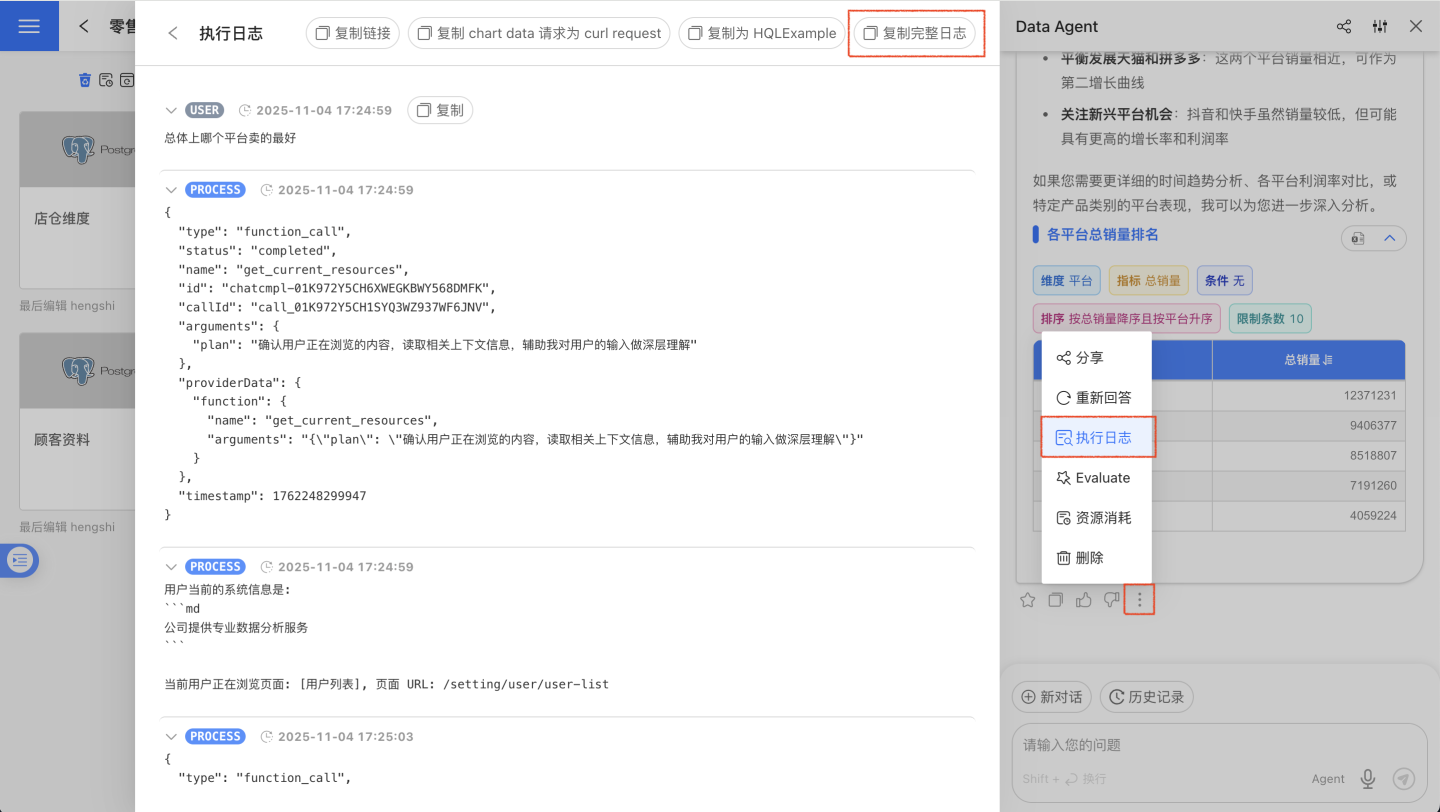
- Click the three-dot menu at the bottom of the conversation card, click “Execution Log”, then click “Copy Full Log”.
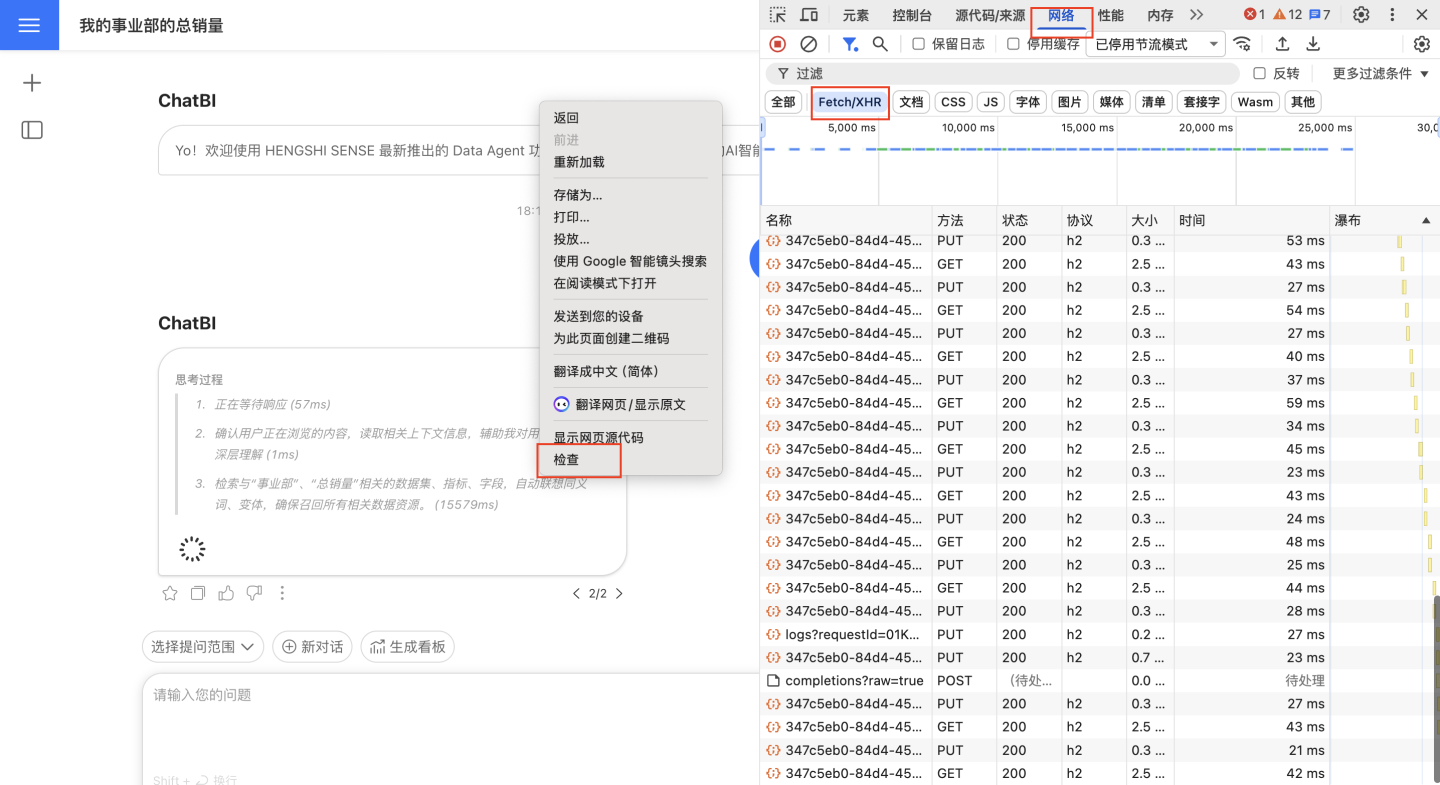
- Press F12 or right-click and choose “Inspect” to open the browser console, then click “Network” → “Fetch/XHR”.
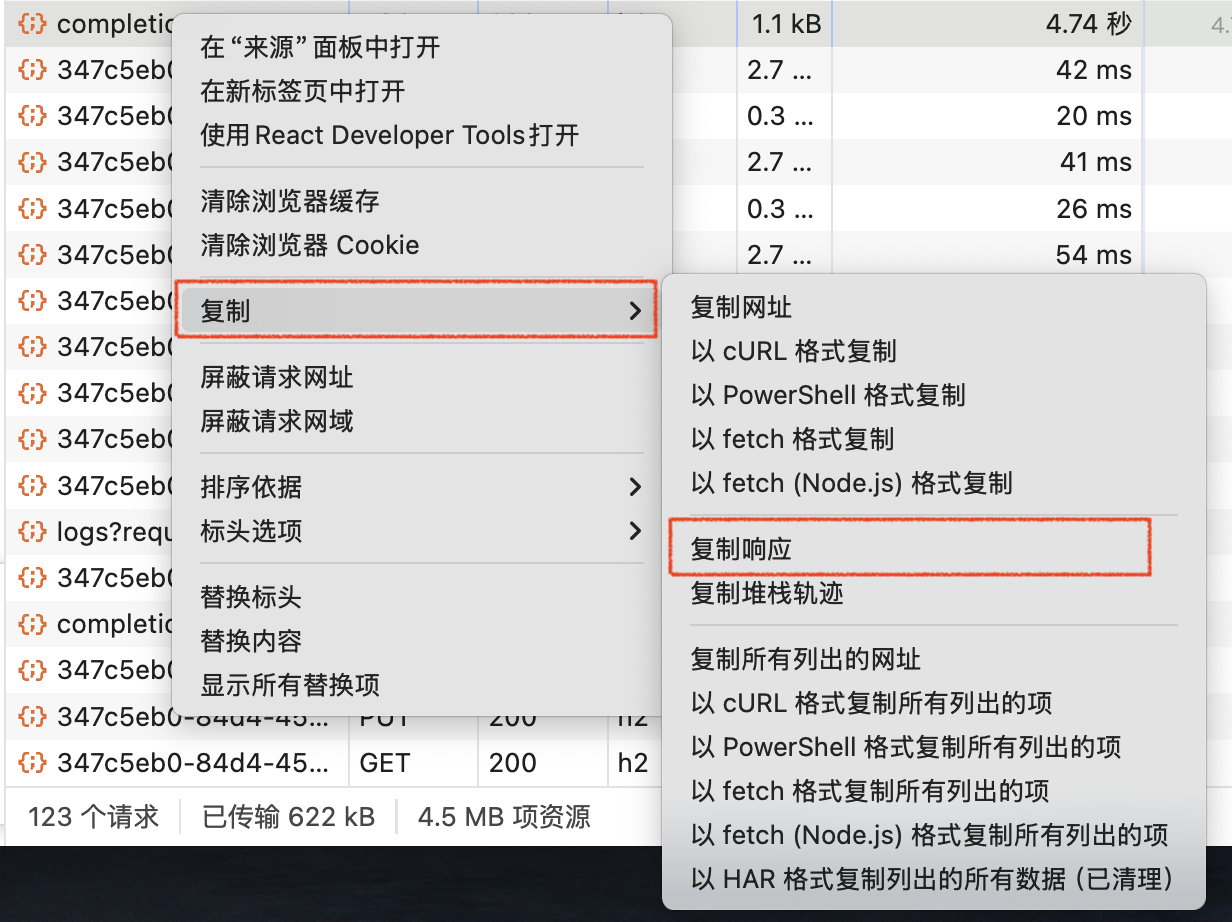
Reproduce the error by asking the question again. Right-click the failed network request and choose “Copy” → “Copy Response”.
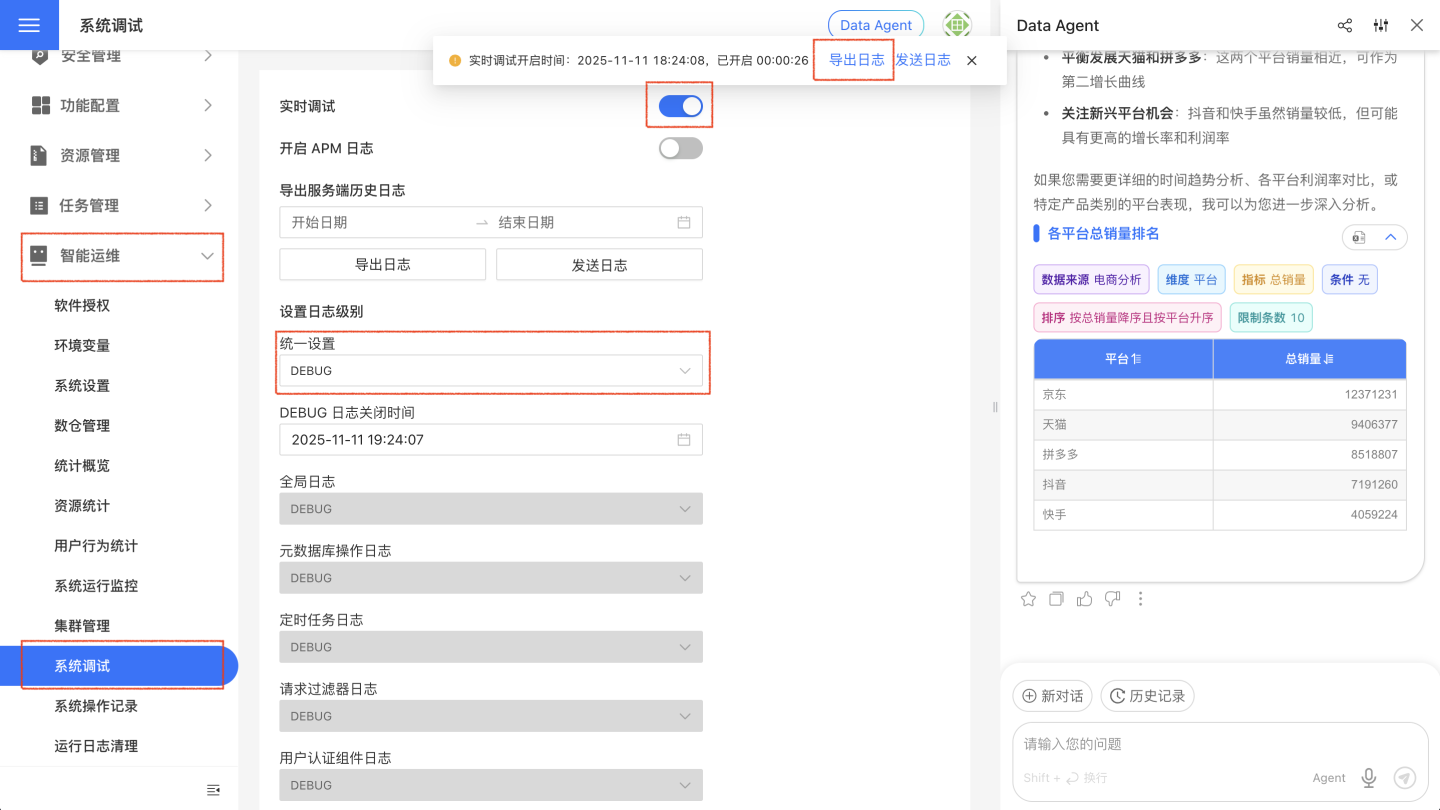
- Go to “System Settings” → “Intelligent Ops” → “System Debug”, change “Global Setting” to “DEBUG”, enable “Real-time Debug”, reproduce the error again, then click “Export Logs”.
How to fill in the vector database address?
Simply follow the AI Assistant Deployment Guide to install and deploy the related services; no manual entry is required.
Does it support other vector models?
Not at present; please contact our support engineer if you have such a requirement.
How does the Data Agent sidebar differ from ChatBI?
| Capability | Data Agent Sidebar | ChatBI |
|---|---|---|
| Smart Q&A on a specified data source | ✅ | ✅ |
| Smart Q&A across any data source | ✅ | ❌ |
| One-click Dashboard from conversational charts | ❌ | ✅ |
| Visual-aided authoring | ✅ | ❌ |
| Metric-aided authoring | ✅ | ❌ |
| Smart insights | ✅ | ❌ |
What are the differences among Agent mode, Workflow mode, and API mode?
| Capability | Agent Mode | Agent API Mode | Workflow & Workflow API Mode |
|---|---|---|---|
| Smart Q&A on a specified Dataset | ✅ | ✅ | ✅ |
| Smart Q&A across any Dataset | ✅ | ✅ | ❌ |
| Visual-assisted authoring | ✅ | ❌ | ❌ |
| Metric-assisted authoring | ✅ | ❌ | ❌ |
| Smart interpretation | ✅ | ❌ | ❌ |