

Authentication & Connection
Pick the target host first
Before CLI can perform any business action, it needs to know which HENGSHI SENSE host it is talking to.
HBI_HOST="<your-hengshi-sense-instance>" hbi auth login --device-loginHBI_HOST can be a bare host or include a subpath such as platform.hengshi.org/bi. When the scheme is omitted, CLI probes https:// first and falls back to http://.
If you want a local default host for interactive use, the simplest local-convenience path is:
# Simplest way to remember a local default host
hbi auth use --host "<your-hengshi-sense-instance>"auth use fits “I already know the host and just want to make it the local default on this machine.” If you maintain a set of named aliases, you can still use instance add / instance use; but for scripts, agents, cron jobs, and multi-environment work, prefer explicit HBI_HOST=... hbi xxx over relying on local-default mechanisms.
Keep the public mental model as a simple decision table:
| Scenario | Recommended | Notes |
|---|---|---|
| Human-operated terminal / someone can approve in a browser (including remote openclaw / SSH) | HBI_HOST=... hbi auth login --device-login | Requires browser approval; CLI stores a renewable sign-in state for the current host and reuses it |
| Automation / service accounts / CI | HBI_HOST=... HBI_CLIENT_ID=... HBI_CLIENT_SECRET=... hbi auth login | Uses client credentials and can keep obtaining/refreshing access tokens |
You already have client_id / client_secret and want to pass values directly (no credential env injection, no prompts) | HBI_HOST=... hbi auth login --client-id "<client_id>" --client-secret "<client_secret>" (or short flags -i/-s) | Passes credential values directly. -i/-s are value flags for Client ID / Secret, not interactive shortcuts. Prefer controlled environments (avoid leaking into shell history) |
| You want to enter and store client credentials interactively | HBI_HOST=... hbi auth login --interactive | Still the client-credentials path: prompts on this machine and stores into the CLI local credential store; not a third auth model |
| You already have a token and only need a one-off override | HBI_TOKEN or --token | Temporary override only; does not create reusable login state and does not promise auto refresh |
Note: “openclaw / SSH” here just means the CLI is running on a remote machine/container; the browser approval step can be completed on any device with a browser.
Public documentation uses HBI_* as the environment-variable namespace.
Option 1: Prefer browser device login
This is the recommended default path. It matches the mental model used by tools like gh auth login and glab auth login: pick the host explicitly, then log in.
HBI_HOST="<your-hengshi-sense-instance>" hbi auth login --device-login

# Equivalent entrypoint when you already know you want device login
HBI_HOST="<your-hengshi-sense-instance>" hbi auth device-loginhbi auth login --device-login and hbi auth device-login run the same browser-based device-login flow. The former fits the unified auth login mental model; the latter is a more direct entrypoint when device login is already the chosen path.
After a successful login, CLI stores the sign-in state for the current host locally and reuses it automatically.
This also works for remote terminals (openclaw / SSH / jump hosts / containers): as long as a human can open the approval page in any browser and confirm the request, device login works. The remote CLI only needs to show the device code / verification URL to the approver.
The browser side opens a dedicated approval page so you can confirm which instance, which device code, and which signed-in identity is approving the request:

Where do I find the personal client / PAT credentials after device login?
After the first successful device login, the system creates or reuses a personal client for the current user. You can inspect it in User Center > Personal Access Token:
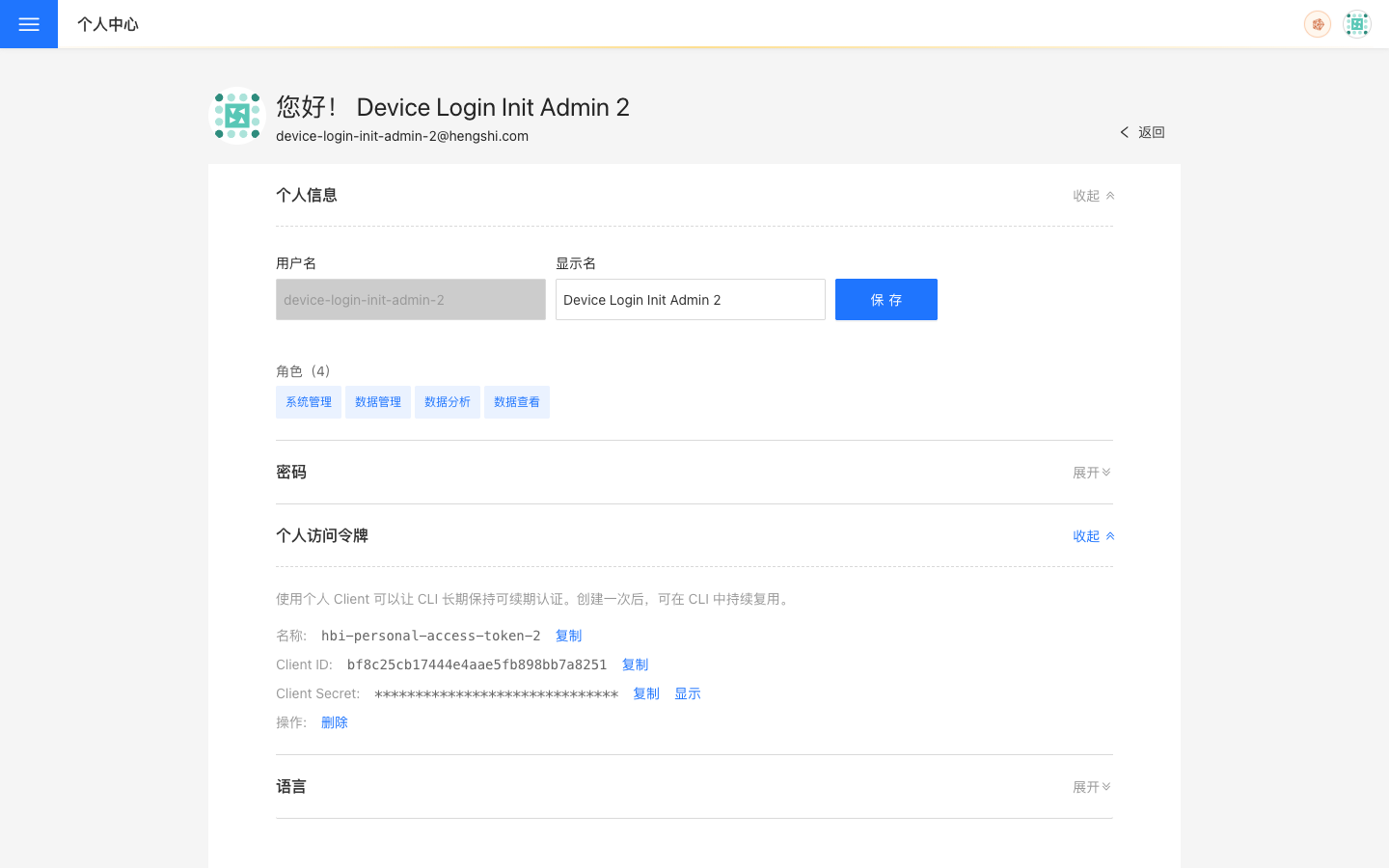
Key points about this panel:
- It shows reusable
Client ID/Client Secret - The page does not display an access token; CLI stores and reuses it through the local credential cache
- If you later want to switch to the
client credentialspath, or provide renewable credentials to an agent runtime or CI job, copy the client credentials from this panel - If you suspect the
client_secretwas leaked, you can delete the current PAT client from this panel; the old client becomes invalid, and the next device-login / PAT token flow will create a fresh personal credential - For normal local desktop usage,
hbi auth login --device-loginis still the preferred path
Option 2: Log in with client credentials (direct credentials)
Use this path for service accounts, CI, agent runtimes, or any environment where you already have client_id / client_secret.
2.1 Non-interactive: provide credentials via environment variables
HBI_HOST="<your-hengshi-sense-instance>" \
HBI_CLIENT_ID="<client_id>" \
HBI_CLIENT_SECRET="<client_secret>" \
hbi auth loginCLI stores the resulting sign-in state locally. As long as valid client credentials remain available, later authenticated commands can continue to obtain or refresh access tokens automatically.
2.2 Non-interactive: pass credentials via CLI flags
If you do not want to pass client_id / client_secret via environment variables, you can pass them directly:
HBI_HOST="<your-hengshi-sense-instance>" hbi auth login --client-id "<client_id>" --client-secret "<client_secret>"

# Short-flag equivalent (they are value flags, not interactive shortcuts)
HBI_HOST="<your-hengshi-sense-instance>" hbi auth login -i "<client_id>" -s "<client_secret>"Note: putting secrets on the command line can leak via shell history, process lists, or CI logs. For automation, prefer secrets + environment variables.
2.3 Interactive: enter and store credentials locally
HBI_HOST="<your-hengshi-sense-instance>" hbi auth login --interactive--interactive prompts for client_id / client_secret on this machine and stores them in the CLI local credential store (config-backed, not the OS keyring). It is still the client credentials (direct credentials) path — just a different input UX, not a third auth model — and is best for human-operated desktop environments.
Option 3: Inject an access token directly
If you already have an access token, you can provide it directly:
HBI_HOST="<your-hengshi-sense-instance>" HBI_TOKEN="<token>" hbi auth statusFor users, this should stay one concept: access token. HBI_TOKEN (environment variable) and --token (global flag) are just two ways to pass the same access token into the CLI. They override saved credentials, but they are not a separate auth system.
Note: token injection does not create reusable sign-in state and does not auto-refresh. Once it expires, you must inject a new token or switch back to the renewable paths above.
This path fits:
- Environments that already distribute short-lived tokens
- Temporary automation tasks
- Runtimes that should not keep client credentials locally
- Cases where token expiry is acceptable and no durable refresh guarantee is needed
Common auth commands
# Inspect current auth state
hbi auth status --output json

# Refresh the access token
hbi auth refresh

# Log out
hbi auth logout

# List supported auth methods
hbi auth methods

# Show the active auth method
hbi auth activePublic usage recommendations
Local desktop usage
Prefer:
HBI_HOST="<your-hengshi-sense-instance>" hbi auth login --device-loginIf you already saved a default host on this machine, you can run hbi auth login --device-login (or hbi auth device-login) without repeating HBI_HOST. But for docs examples, scripts, and multi-environment work, still prefer explicit HBI_HOST=....
Agent runtimes / CI
Prefer:
HBI_HOST="<your-hengshi-sense-instance>" \
HBI_CLIENT_ID="<client_id>" \
HBI_CLIENT_SECRET="<client_secret>" \
hbi auth loginThis path does not depend on the OS keyring; CLI stores renewable sign-in state in its config-backed local credential store.
Existing access token workflows
Prefer:
export HBI_TOKEN="<token>"For a one-off override, you can also use the global flag:
hbi --token "<token>" auth statusCredential-safety recommendations
- Do not hardcode access tokens or client secrets into scripts, docs, or repositories
- For automation, prefer secrets or environment-variable injection
- For local desktop usage, prefer browser device login
- Do not paste full
auth statusoutput into public channels
Current CLI releases no longer integrate with the OS keyring. The default behavior and --credential-store config both use the CLI config-backed local credential store; --credential-store keyring remains only as a compatibility surface and fails explicitly.
If you still see OS keyring prompts on macOS, in containers, on remote development boxes, or in partial desktop sessions, you are usually running an old or non-current official hbi binary. Install or update to the official release and log in again. For runtimes that must not keep client credentials locally, use a one-off HBI_TOKEN / --token instead.
Common connection issues
HBI_HOST or a local default host is not set
CLI does not know which host to target and will usually fail on the first request. Check:
echo "$HBI_HOST"
hbi instance currentIf you do not want to rely on local defaults, pass HBI_HOST=... explicitly on the command line.
Login succeeded but the expected resources are missing
Check these first:
- The CLI is pointing to the wrong host / instance
- The current identity lacks access to the target app, dataset, connection, or space
- The agent runtime inherited a different set of environment variables than your shell
Tokens expire or auth feels unstable
Start with:
hbi auth status --output json
hbi auth refreshIf you rely on client credentials, also confirm that HBI_CLIENT_ID and HBI_CLIENT_SECRET are still valid.