

AI Model Configuration
Start Configuration
Request Address
Whether it is a model provided by a cloud service provider or a privately deployed model, an HTTP service address must be provided, either an IP address or a domain name.
Cloud Service Providers
The model endpoints provided by cloud service providers usually end with completions, for example:
- DeepSeek:
https://platform.deepseek.com/chat/completions - OpenAI:
https://api.openai.com/v1/chat/completions
The model endpoint for Microsoft Azure depends on your own deployment. Refer to this step to obtain the request URL.
Privately Deployed Models
The address of a privately deployed model depends on the specific implementation. If the service is provided via Ollama within an intranet, the address is typically http://localhost:8000/api/generate.
Key
Models provided by cloud service providers usually require an API Key.
For privately deployed models, it depends on the specific implementation. If the service is provided via Ollama within an intranet, the key can be left empty.
Note
The API Key from the model provider must be applied for by the user and kept securely.
Other Vendors
On the page, you can also see that we support the following model vendors, but we currently cannot guarantee the performance of these models:
- DeepSeek
- OpenAI
- 01AI
- Baichuan AI
- Bedrock
- Groq Cloud
- MiniMax
- MistralAI
- MoonShot AI
- Nvidia
- TogetherAI
- Tongyi Qianwen
Note
The performance of large models depends on the model vendors, and HENGSHI SENSE cannot guarantee the effectiveness of all models. If you find unsatisfactory results, please contact support@hengshi.com or the model vendor promptly.
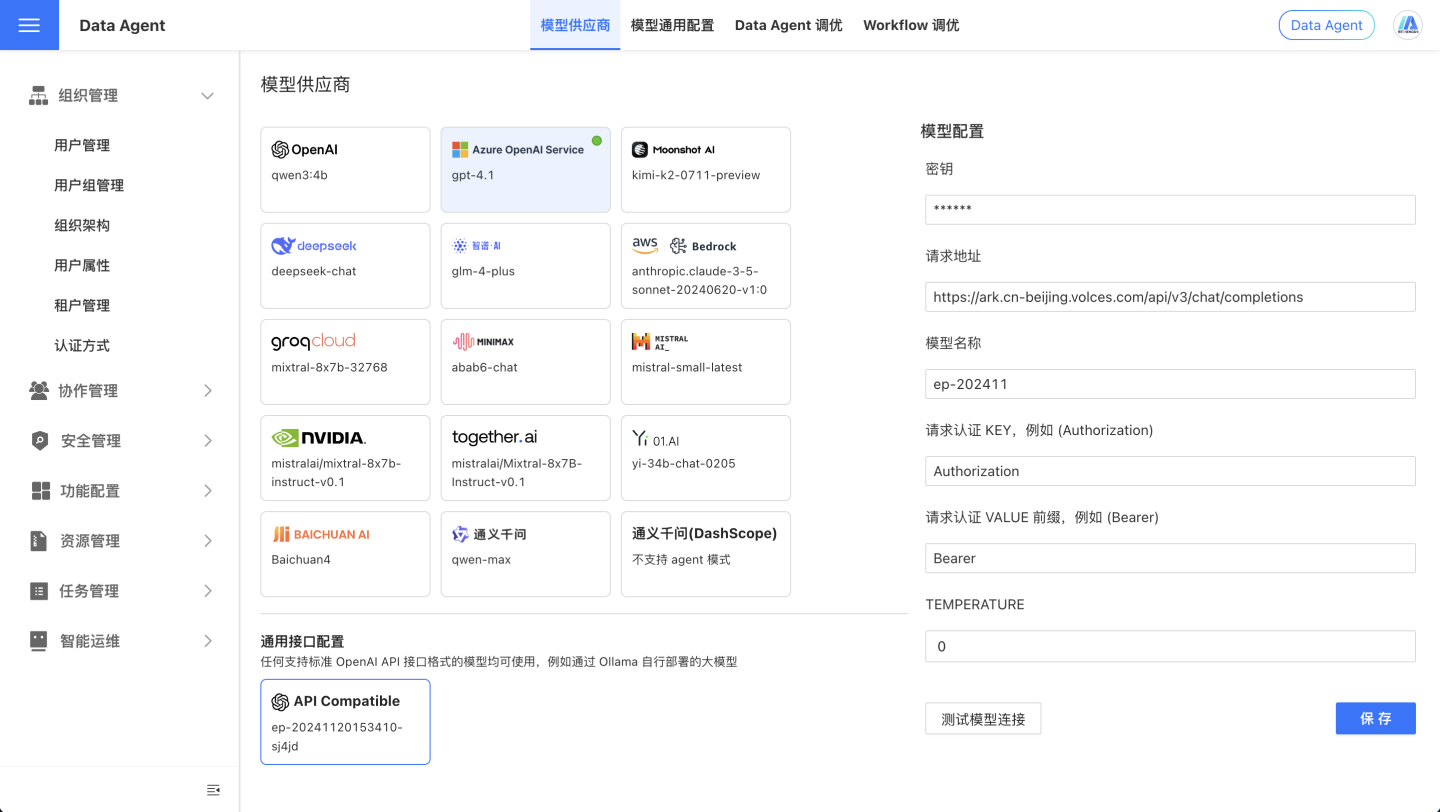
OpenAI-API-Compatible
If you need to use models other than those listed above, please select the OpenAI-API-Compatible option. Any model compatible with the OpenAI API format can be used.
Take Doubao AI as an example, you can configure it as follows:
OpenAI API Format
If you need to deploy a private model, ensure that the HTTP service's request address and response format are consistent with the OpenAI API. The input and output formats are as follows:
curl https://api.openai.com/v1/chat/completions \
  -H "Content-Type: application/json" \
  -H "Authorization: Bearer $OPENAI_API_KEY" \
  -d '{
    "model": "gpt-4o",
    "messages": [
      {
        "role": "developer",
        "content": "You are a helpful assistant."
      },
      {
        "role": "user",
        "content": "Hello!"
      }
    ]
}'{
"id": "chatcmpl-123",
"object": "chat.completion",
"created": 1677652288,
"model": "gpt-4o-mini",
"system_fingerprint": "fp_44709d6fcb",
"choices": [{
"index": 0,
"message": {
"role": "assistant",
"content": "\n\nHello there, how may I assist you today?",
},
"logprobs": null,
"finish_reason": "stop"
}],
"usage": {
"prompt_tokens": 9,
"completion_tokens": 12,
"total_tokens": 21,
"completion_tokens_details": {
"reasoning_tokens": 0,
"accepted_prediction_tokens": 0,
"rejected_prediction_tokens": 0
}
}
}Test Model Connection
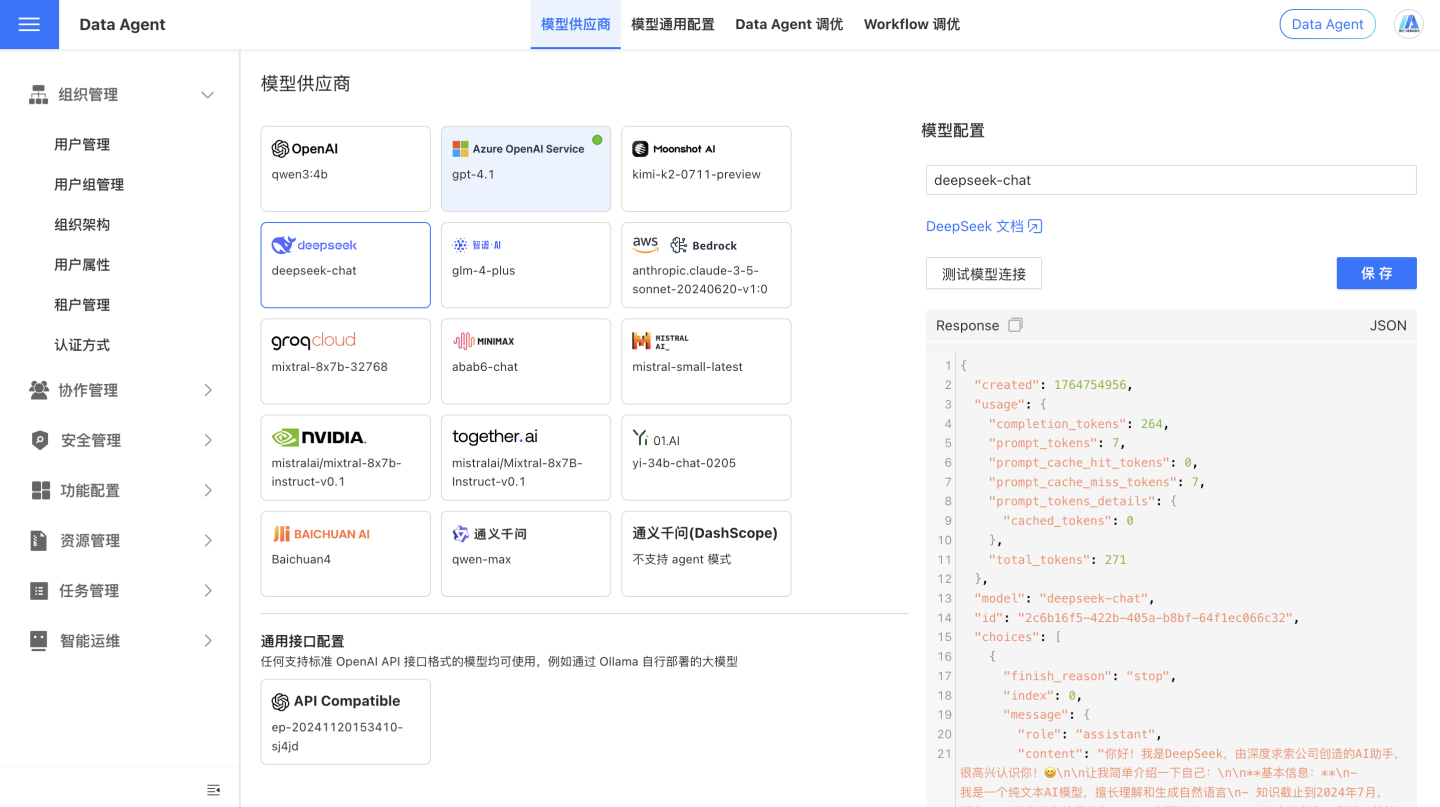
After configuring the model's API Key, click the Test Model Connection button to check if the model connection is functioning properly. As shown in the image below, if the connection is successful, the return content from the model interface will be displayed.
Response Speed
The output speed of a large model is the result of multiple factors, including hardware, model complexity, input and output length, optimization techniques, and system environment. Generally speaking, privately deployed small models tend to have slower response speeds and poorer performance compared to models provided by cloud service providers.
How to Troubleshoot Model Connection Failure?
There are various reasons for connection failure. It is recommended to troubleshoot by following these steps:
Check Request Address
Ensure that the model address is correct, as different vendors provide different model addresses. Please refer to the documentation provided by the vendor you purchased from.
We can provide initial troubleshooting guidance:
- Model addresses from various providers usually end with
<host>/chat/completionsrather than just the domain name, for example,https://api.openai.com/v1/chat/completions. - If your model vendor is Azure OpenAI, the model address is structured as
https://<your-tenant>.openai.azure.com/openai/deployments/<your-model>/chat/completions, where<your-tenant>is your tenant name and<your-model>is your model name. You need to log in to the Azure OpenAI platform to check. For more detailed steps, please refer to Connect to Azure OpenAI. - If your model vendor is Tongyi Qianwen, there are two types of model addresses: one compatible with the OpenAI format,
https://dashscope.aliyuncs.com/compatible-mode/v1/chat/completions, and another specific to Tongyi Qianwen,https://dashscope.aliyuncs.com/api/v1/services/aigc/text-generation/generation. When using the OpenAI-compatible format (indicated bycompatible-modein the URL), please selectOpenAIorOpenAI-API-compatibleas the provider in the HENGSHI Intelligent Query Assistant model configuration. - If your model is privately deployed, ensure that the model address is correct, the model service is running, and the model provides an HTTP service with an interface format compatible with the OpenAI API.
Check the Key
- The large model interfaces provided by various model vendors usually require a key for access. Please ensure that the key you provide is correct and has permission to access the model.
- If your company has deployed its own model, a key may not be required. Please confirm this with your company's developers or engineering team.
Check Model Name
- Most model providers generally offer multiple models. Please select the appropriate model based on your needs and ensure that the model name you provide is correct and that you have access to the model.
- If your company uses a self-deployed model, the model name may not be required. Please confirm with your company's developers or engineering team.