

Configuration File
The configuration file contains the configuration parameters for HENGSHI SENSE. You can modify the configuration file to change the service mode of HENGSHI SENSE.
Configuration File Description
The configuration files are located in the conf directory and include hengshi-sense-env.sh and engine-segment-hosts. The engine-segment-hosts file is used to store configuration information for the segment tables of the acceleration engine, while hengshi-sense-env.sh contains all configuration items except for the acceleration engine segment host list.
Tip
If conf/hengshi-sense-env.sh does not exist, you can generate this file by copying the conf/hengshi-sense-env.sh.sample template.
After modifying the configuration files, you need to restart the HENGSHI service for the changes to take effect.
Configuration for Acceleration Engine
The configuration for the acceleration engine is only required when installing the acceleration engine.
Engine Management Module Master
The engine management module master is a standalone machine. Its IP or hostname can be configured via theconf/hengshi-sense-env.shconfiguration file using theHS_ENGINE_HOSTparameter.Engine Data Query Module Segment
The engine data query module segment can be configured on multiple machines. Its IP or hostname is configured via theconf/engine-segment-hostsconfiguration file, with each line representing the IP or hostname of a segment. By default, the system generates a configuration containing onlylocalhost.
Data Directory Configuration Recommendations
Please refer to the following recommendations for data directory configuration.
- During initial installation, the program and system data require at least 3GB of space.
- If there are many uploaded files occupying significant space, it is recommended to configure the HS_HENGSHI_DATA directory on a large disk. System data, uploaded data, and acceleration engine data are all stored in this directory.
- If the acceleration engine needs to accelerate large datasets, it is recommended to configure the HS_ENGINE_HOME directory on a large disk. Once configured, the acceleration engine data will be stored independently of HS_HENGSHI_DATA in this directory.
Common Configuration Variables Description
All configuration items need to be written into the conf/hengshi-sense-env.sh file.
| Parameter | Purpose |
|---|---|
| JAVA_HOME | The runtime Java environment directory. |
| HS_HENGSHI_PORT | HENGSHI WEB service port, default is 8080. BI prohibits root startup; for ports below 1024, please configure proxy forwarding, such as nginx. |
| HS_HENGSHI_DATA | The root directory for storing all HENGSHI data. By default, it is under the installation directory. If there is a large partition dedicated to storing data, this variable can be configured. |
| HS_PG_HOST | Internal database host. When not using HENGSHI metadb, this variable can be used to modify the configuration. |
| HS_PG_PORT | Internal database listening port, default is 54320. If it conflicts with existing service ports, this variable can be used to change the port. |
| HS_PG_DB | Internal database name. |
| HS_PG_USR | Internal database username. |
| HS_PG_PWD | Internal database password. Passwords for HS_PG_PWD and HS_SYSLOG_PWD must not contain %, &, or +. When assigning them in conf/hengshi-sense-env.sh, use single quotes only, not double quotes; for example, HS_PG_PWD='password'. |
| HS_ENGINE_HOME | Path to engine data files. |
| HS_ENGINE_HOST | Engine host. After configuration, the master module of the engine will be deployed on the corresponding machine. Default is localhost. |
| HS_ENGINE_SEGMENTS | Engine worker nodes, an array. Default is (localhost). For multiple nodes, an example would be (Node-A Node-B Node-C). |
| HS_ENGINE_PORT | Engine port. |
The default maximum JVM memory for HENGSHI startup is 6G. If you need to modify it, use HENGSHI_JAVA_OPTS. For example, to change it to a minimum of 1G and a maximum of 4G, configure export HENGSHI_JAVA_OPTS="-Xms1g -Xmx4g" in conf/hengshi-sense-env.sh.
Password Encryption in Configuration Files
If there is a requirement to store only encrypted passwords in the conf/hengshi-sense-env.sh configuration file, you can follow the steps below:
- Generate the encrypted password
The following command will generate the encrypted password for'abc123abc123abc123abc123abc123abc123abc123abc123':
cd /opt/hengshi;
bin/gete.sh "abc123abc123abc123abc123abc123abc123abc123abc123"
# Program output
U2FsdGVkX1/Ol74LahZWp6HlMspWmBHL5c4/s20Aw7o/z89q9pUITWfE/w2RCAu9
eyjEPtdGLOfXg3OGVcr9CJRPwgmpQWmWHvZ4j1aBmH8=- Replace the variable in the configuration file
For example, replace the configuration for"HS_PG_RO_PWD":
HS_PG_RO_PWD="abc123abc123abc123abc123abc123abc123abc123abc123"
# Replace with
E_HS_PG_RO_PWD="U2FsdGVkX1/Ol74LahZWp6HlMspWmBHL5c4/s20Aw7o/z89q9pUITWfE/w2RCAu9
eyjEPtdGLOfXg3OGVcr9CJRPwgmpQWmWHvZ4j1aBmH8="Note: If both plaintext and encrypted configurations exist, the encrypted configuration will take precedence. For example, if both HS_PG_RO_PWD and E_HS_PG_RO_PWD are configured, the final effective configuration will be "E_HS_PG_RO_PWD".
- Supported Variable Mapping for Encrypted Configuration
| Plaintext Variable | Encrypted Variable |
|---|---|
| HS_PG_PWD | E_HS_PG_PWD |
| HS_PG_RO_PWD | E_HS_PG_RO_PWD |
| HS_ENGINE_PWD | E_HS_ENGINE_PWD |
| HS_SYSLOG_PWD | E_HS_SYSLOG_PWD |
| HS_ACCESSLOG_PWD | E_HS_ACCESSLOG_PWD |
| QUARTZ_PWD | E_QUARTZ_PWD |
| GREENPLUM_QUERY_PWD | E_GREENPLUM_QUERY_PWD |
| GREENPLUM_ETL_PWD | E_GREENPLUM_ETL_PWD |
| MINIO_ROOT_PASSWORD | E_MINIO_ROOT_PASSWORD |
| REDIS_PASSWORD | E_REDIS_PASSWORD |
JDBC Driver Management (driverctl)
Starting in 7.0, all JDBC drivers are no longer on the main classpath. They live in object storage; nodes sync them to a local cache and load on demand. Ops tool: bin/driverctl (Windows: bat\driverctl.bat).
A standard first install should use a package with bundled JDBC drivers; a package without them fails on empty object storage. 4.x/5.x/6.x → 7.0+ must use a package or image with bundled drivers. Upgrade and recovery: Upgrade notices.
IMPORTANT
For import / migrate / delete: stop HENGSHI business services, keep MinIO/S3 running, and run on only one node at a time.
Prerequisites
- Java 21+ (resolved from
conf/hengshi-sense-env.sh,HS_JDK_HOME,JAVA_HOME, orPATH) - No
mcclient required - Object storage must be reachable.
driverctlloadsconf/hengshi-sense-env.shand needs:OBJECT_SERVER_ENDPOINT, orMINIO_SERVER_HOST+MINIO_SERVER_PORTMINIO_ACCESS_KEY/MINIO_SECRET_KEY, orMINIO_ROOT_USER/MINIO_ROOT_PASSWORD- Optional:
OBJECT_ROOT_BUCKET_NAME(defaulthengshi) - If you see
missing ... OBJECT_SERVER_ENDPOINT, set the variables above in conf and retry
Driver directory layout
Each subdirectory under the root is one package; files inside must be flat (no nested lib/).
Pass the outer directory to import --drivers-dir. list displays each immediate subdirectory name. Use that name with show --entry or delete --entry. See Default driver directories for directory names and shared packages.
prepared-drivers/
├── mysql/                 # no jdbc-config.json → default mapping
│   └── mysql-connector-j.jar
└── hive3/                  # with jdbc-config.json → explicit (name, version)
    ├── jdbc-config.json
└── hive-jdbc.jarExample jdbc-config.json:
{
  "name": "hive",
  "version": "3",
  "driverName": "org.apache.hive.jdbc.HiveDriver",
  "configs": { "_hs_set_auto_commit": false }
}name and version are required and must be unique as a pair. Shared physical packages (e.g. hive/, mysql/) must not contain jdbc-config.json.
Driver paths and cache
$EVEREST_HOME/lib/default-datasource-drivercontains the installation seeds used for publication.jdbc-drivers/is the driver store prefix in the object storage bucket.$EVEREST_HOME/lib/jdbc-driver-cacheis the default local cache on each node.
Set JDBC_DRIVER_CACHE_DIR in the application environment to change the cache path.
Commands
bin/driverctl <subcommand> [options]
# Windows: bat\driverctl.bat <subcommand> [options]

bin/driverctl import --drivers-dir prepared-drivers/
bin/driverctl list
bin/driverctl show --entry hive3
bin/driverctl delete --entry hive3 --yes
bin/driverctl export --output-dir /opt/hengshi/lib/jdbc-driver-cache
bin/driverctl export --output-dir /opt/hengshi/lib/jdbc-driver-cache --force
bin/driverctl migrate --drivers-dir /opt/hengshi/lib/default-datasource-driver
# Windows: bat\driverctl.bat migrate --drivers-dir lib\default-datasource-driverimport: overwrite upload by subdirectory; remote entries not in the input are kept.migrate: only if Flyway failed (object storage not yet initialized). Use--drivers-dirto specify the seed directory. If omitted,migratelooks forlib/default-datasource-driverunder the installation directory.export: read-only cache export
Deployment types
| Type | Notes |
|---|---|
| VM | Stop with bin/hengshi-sense-bin stop hengshi before writes; upgrade: Standalone upgrade |
| Ansible | Run bin/driverctl on one host in the [hengshi] group in ansible/hosts; do not run it on the control node if that node is not in the group. Upgrade: Cluster upgrade |
| Docker | docker compose stop hengshi, then run --rm --no-deps hengshi driverctl …; files go under hsdata/driverctl/import/. Upgrade: Docker upgrade |
| K8s | Scale hengshi to 0 before writes; run driverctl via hengshi-driverctl.yaml (or Helm hengshi-driverctl). If a custom JDBC PVC already exists, mount that same PVC on the hengshi-driverctl pod. Upgrade: Kubernetes upgrade |
| Windows | Day-to-day writes: keep hengshi-minio, stop hengshi-everest; do not use bat\stop-hengshi.bat (stops MinIO). Upgrade: Windows upgrade |
| WAR | Use matching driverctl-companion-*.zip with object-storage env vars |
Troubleshooting
_PENDING (exit 3): interrupted write. Re-run import covering unfinished entries, or delete --entry ... --yes. Do not manually delete _PENDING in MinIO.
MinIO snapshot rollback, nodes not refreshing: stop business services → restore MinIO → clear each node's lib/jdbc-driver-cache or driverctl export --force → start business services.
| Exit | Meaning |
|---|---|
| 0 | Success |
| 1 | Bad args / directory / JSON |
| 2 | Java or object-storage env unavailable |
| 3 | _PENDING / protocol error |
Console output redacts passwords and secrets.
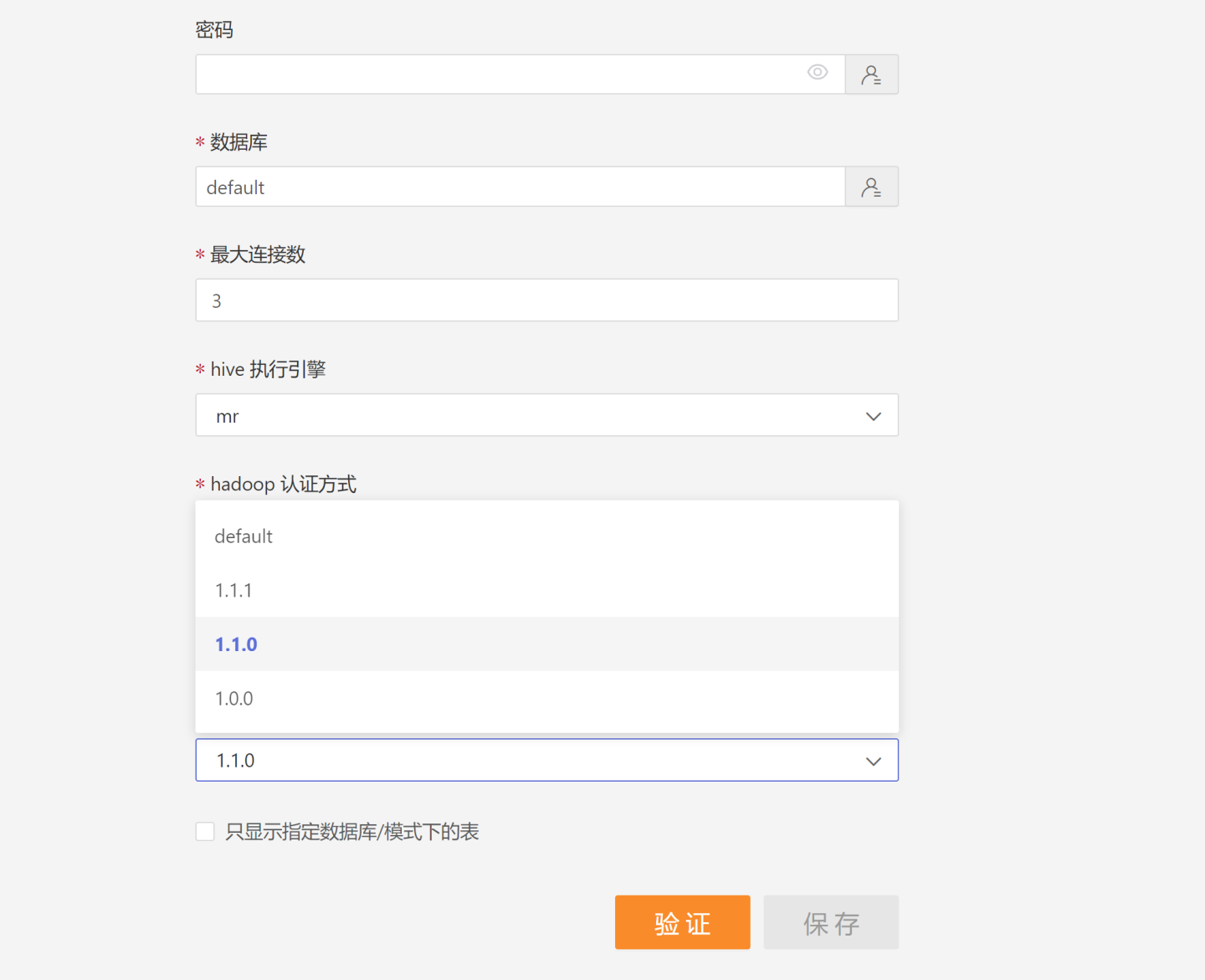
Data connection UI versions
After import and sync, pick default or an explicit version from jdbc-config.json.
Default driver directories
When importing default driver packages, use the directory names below exactly as shown, including capitalization. Data sources on the same row share one driver package.
| Default driver directory | Data sources |
|---|---|
argodb/ | ArgoDB |
athena/ | Amazon Athena |
clickhouse/ | ClickHouse |
dameng/ | Dameng |
databricks/ | Databricks |
db2/ | DB2 |
denodo/ | Denodo |
gbase8a/ | GBase 8a |
gbase8s/ | GBase 8s |
hbase/ | HBase |
hive/ | Hive, Spark SQL |
impala/ | Cloudera Impala |
influxdb/ | InfluxDB |
kap/ | Kyligence Enterprise |
kingbaseES/ | KingbaseES |
kylin/ | Kylin |
maxcomputeNative/ | MaxCompute |
mongodb/ | MongoDB |
mysql/ | MySQL, Apache Doris, StarRocks, StarRocks Catalog, SelectDB, TiDB, TDSQL MySQL, AnalyticDB MySQL, AtomData, OceanBase |
netsuite/ | NetSuite |
oracle/ | Oracle |
phoenix/ | Phoenix |
presto/ | Presto |
redshift/ | Amazon Redshift |
sapCube/ | SAP BW |
saphana/ | SAP HANA |
solr/ | Apache Solr |
sqlserver/ | SQL Server |
tdengine/ | TDengine |
trino/ | Trino |
vertica/ | Vertica |
yunqiLakehouse/ | Cloud Lakehouse |
Secondary Access Path Configuration
The requirement for secondary path access relies on reverse proxy tools such as Nginx, with different versions having different configuration methods.
Configuration Method One
This configuration method is applicable to version 5.0.2 and above.
Nginx Reference Configuration
The configuration process uses the /bi secondary path as an example.
- prefix style
   location /bi/ {             #<====[1/3] Path prefix
        proxy_set_header Accept-Encoding "";  #<====[2/3] Do not omit this; it is required when compression is enabled
        proxy_set_header X-HS-Sub-Path "/bi/"; #<====[3/3] /bi/ Path prefix, consistent with the location declaration
        proxy_set_header X-Forwarded-Host $host;
        proxy_set_header X-Forwarded-Proto $scheme;
        proxy_pass http://hengshi-server/;
}- longest matching prefix style
   location ^~ /bi/ {             #<====[1/3] Path prefix
        proxy_set_header Accept-Encoding "";  #<====[2/3] Do not omit this; it is required when compression is enabled
        proxy_set_header X-HS-Sub-Path "/bi/"; #<====[3/3] /bi/ Path prefix, consistent with the location declaration
        proxy_set_header X-Forwarded-Host $host;
        proxy_set_header X-Forwarded-Proto $scheme;
        proxy_pass http://hengshi-server/;
}- regex style
   location ~ ^/bi {             #<====[1/3] Path prefix
        proxy_set_header Accept-Encoding "";  #<====[2/3] Do not omit this; it is required when compression is enabled
        proxy_set_header X-HS-Sub-Path "/bi/"; #<====[3/3] /bi/ Path prefix, consistent with the location declaration
        proxy_set_header X-Forwarded-Host $host;
        proxy_set_header X-Forwarded-Proto $scheme;
        rewrite ^/bi/(.*) /$1 break;  #<==== Rewrite URI
        proxy_pass http://hengshi-server;  #<==== No URI at the end of the path; there is no trailing '/'
}Ingress Reference Configuration
During the configuration process, use the /bi secondary path as an example.
apiVersion: networking.k8s.io/v1
kind: Ingress
metadata:
  annotations:
    nginx.ingress.kubernetes.io/configuration-snippet: |
      proxy_set_header Accept-Encoding "";     #<====[2/3] Do not omit this; it is required when compression is enabled
      proxy_set_header X-HS-Sub-Path "/bi/";   #<====[3/3] /bi/ path prefix, consistent with the location declaration
      proxy_set_header X-Forwarded-Host $host;
      proxy_set_header X-Forwarded-Proto $scheme;
spec:
  ingressClassName: nginx
  rules:
    - host: example.hengshi.com
      http:
        paths:
          - path: /bi/     #<====[1/3] Path prefix
pathType: PrefixConfiguration Method Two
This configuration method is applicable to versions 5.0.1 and 5.0.
Nginx Reference Configuration
The configuration uses the /bi secondary path as an example.
   upstream hengshi-server {
         server 127.0.0.1:8080;
}- prefix style
   location /bi/ {             #<====[1/3] Path prefix, no regex matching
        proxy_set_header Accept-Encoding "";  #<====[2/3] Do not omit this; it is required when compression is enabled
        proxy_set_header X-Forwarded-Host $host;
        proxy_set_header X-Forwarded-Proto $scheme;
        proxy_pass http://hengshi-server/;
        sub_filter_once on;
        sub_filter '<base href="/">' '<base href="/bi/" />';  #<====[3/3] /bi/ path prefix, consistent with the location declaration
}- regex style
    location ^/bi/(.*) {             #<====[1/4] Path rule
        proxy_set_header Accept-Encoding "";  #<====[2/4] Do not omit this; it is required when compression is enabled
        proxy_set_header X-Forwarded-Host $host;
        proxy_set_header X-Forwarded-Proto $scheme;
        proxy_pass http://hengshi-server/$1;  #<====[3/4] Pass the remaining part of the path '$1' in the URI to the upstream
        sub_filter_once on;
        sub_filter '<base href="/">' '<base href="/bi/" />';  #<====[4/4] /bi/ path prefix, consistent with the location declaration
}- exact match (This type can only match one API address and cannot match other APIs; it is used for special scenarios)
    location = /bi/api/auth/login-info {       #<====[1/4] Exact match path
        proxy_set_header Accept-Encoding "";  #<====[2/4] Do not omit this; it is required when compression is enabled
        proxy_set_header X-Forwarded-Host $host;
        proxy_set_header X-Forwarded-Proto $scheme;
        proxy_pass http://hengshi-server/api/auth/login-info;  #<====[3/4] Write the full path of the upstream
        sub_filter_once on;
        sub_filter '<base href="/">' '<base href="/bi/" />';  #<====[4/4] /bi/ path prefix, consistent with the location declaration
}Ingress Reference Configuration
Use the secondary path /bi as an example during configuration.
apiVersion: networking.k8s.io/v1
kind: Ingress
metadata:
  name: hengshi-sense
  namespace: hengshi
  annotations:
    nginx.ingress.kubernetes.io/configuration-snippet: |
      proxy_set_header Accept-Encoding "";
      proxy_hide_header Access-Control-Allow-Origin;
      proxy_set_header X-Forwarded-Host $host;
      proxy_set_header X-Forwarded-Proto $scheme;
      sub_filter_once on;
      sub_filter '<base href="/">' '<base href="/bi/" />';
    nginx.ingress.kubernetes.io/rewrite-target: /$2
spec:
  ingressClassName: nginx
  rules:
    - host: example.hengshi.com
      http:
        paths:
          - path: /bi(/|$)(.*)
            pathType: Prefix
            backend:
              service:
                name: hengshi-sense
                port:
number: 8080Tip
The CONTEXT_PATH parameter is no longer effective in this version.