

Data Agent
Applies to HENGSHI SENSE 7.0.
Data Agent uses natural language to query data, analyze results, and create BI resources. HENGSHI runs the Agent on the server. Product pages, browser SDKs, and external APIs share the conversation service. Users do not configure model secrets or run an Agent in their browser.
Before you begin
- Confirm that Data Agent is licensed and the deployment administrator has enabled its services. See AI deployment and upgrade.
- Configure and verify a Responses model profile, then select the default. Applications and data packages can bind their own profile.
- Grant users access to the relevant applications, data packages, measure subjects, and resources. Data Agent uses the current user's permissions; it cannot expand data access or write permissions.
- Describe datasets, fields, measures, relationships, and business definitions. Use dataset knowledge management for default filters, time grain, metric formulas, and synonyms.
For example, when an order has multiple detail rows, define “average order amount = total sales amount / distinct order count” so row count is not mistaken for order count.
Ask and Act modes
| Mode | Entry and purpose | Scope and permissions |
|---|---|---|
| Ask | Standalone ChatBI page, Ask in the global Data Agent, or Intelligent Interpretation on a saved dashboard | One application/data package, one measure subject, or one saved dashboard; read-only queries |
| Act | Act in the global Data Agent | Perform platform operations within the current user's permissions; page context helps locate resources |
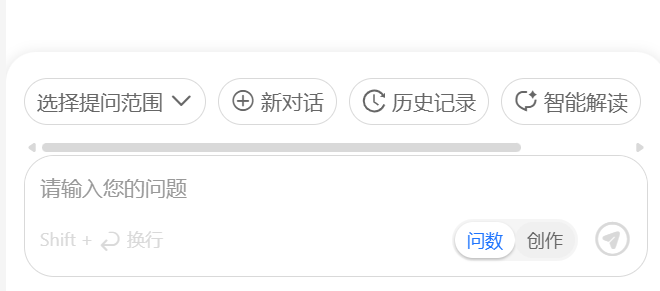
The mode switch is at the bottom right of the composer; changing the mode or scope starts a new conversation.

In the Chinese UI shown, the ChatBI home shortcut opens standalone queries, and the Data Agent header button opens the global sidebar.
Switching modes creates a new conversation. A follow-up question or page navigation cannot turn an Ask conversation into an Act conversation. The former Agent / Workflow runtime choice does not apply to 7.0.
Query scope
Query scope is optional by default. Without a scope, the conversation runs against every application the signed-in user can access: the system identifies the business objects in the question, locates the application/data package, and reads the model facts. When several candidates fit, it asks the user before proceeding and never guesses. The answer names the application or dataset that was used.
Data Agent can discover and query multiple datasets and relationships within an application/data package, but cannot analyze across applications. A measure subject can include its visible child subjects; multiple independent subjects cannot be combined into one scope.
In 7.0 the finest scope is an application/data package (earlier versions allowed dataset-level selection). Once a scope is selected, mode and scope are fixed when the conversation is created; API callers must create a new conversation to change scope or mode.
Administrators can turn off System Settings → AI Assistant → Conversation & presentation → Query scope optional. When off, new read-only conversations on the ChatBI page and sidebar must select an application/data package or measure subject. The sidebar in a published App Market application and dashboard interpretation always use the application or dashboard scope and are not affected by this setting.
Data you can ask about in a new conversation
In an empty conversation in the global Data Agent sidebar, the data the signed-in user can ask about is listed below the welcome text:
- With no scope selected, it lists application/data packages (data mart first, then team space, then the creation area) and first-level measure subjects. A card shows its area only when the list mixes several areas.
- With an application/data package selected, it lists that application's datasets.
- Clicking a card does not send a question. In Ask mode it selects the matching scope and fills the input with an editable starter sentence; in Act mode it leaves the scope unchanged and fills a starter that begins with "Based on "name"". Review or edit it, then send.
- Only resources the user can read are listed. When the list is truncated, add a business keyword to the question.
- When nothing is accessible, a message asks the user to contact an administrator.
The standalone ChatBI page does not show this block; it keeps the scope selector and question templates.
The welcome text and this block appear only in an empty conversation. They collapse once the conversation has content and do not appear when an existing conversation is reopened.
Scope and model profile identity remain fixed after creation. Profile revision is audit metadata; changes to the model, timeout, or reasoning effort take effect on the next turn, while a running turn keeps the settings resolved when it started. Create a new conversation to change scope. If the profile is disabled or unavailable, history remains readable; restore a valid configuration or start a new conversation to continue.
See ChatBI user guide for instructions.
What Act mode can do
Act mode is the Data Agent capability beyond asking questions: within the signed-in user's permissions it directly creates, changes and configures platform resources, not only generating content. Resource tasks include:
- Data preparation: datasets, data models, data-integration pipelines, scripts
- Analysis building: charts, dashboards, business metrics, measure subjects
- Operations: discovering and validating schedules, refresh and data alerts (schedule creation needs user confirmation; update and enable/disable are not available yet)
Specify the goal, resource, and required conditions, such as “Create a monthly sales dashboard in the Sales application.” The service uses bounded page context to locate resources and executes through server resource APIs.
Publishing, sharing, authorization, export, permission management and permanent deletion do not run through Act mode; use the existing product entry points. See Ask and Act capabilities for the item-by-item list.
Act mode does not grant every permission and never bypasses the current account's permission boundary. High-risk operations are enabled individually. Schedule creation requires user confirmation, and the service rechecks permissions, resources, content, and expiry when confirming. Use the existing product entry points for rejected operations.
Dashboard interpretation
- Open a saved dashboard you can access.
- Select Intelligent Interpretation. Save any outstanding changes in the editor first.
- The service creates a read-only conversation scoped to that dashboard and considers visible filters as analysis hints.
- Follow-up questions use the same dashboard scope.
Visible filters cannot bypass server data permissions. Unsaved page state does not grant access or editing authority.
Results, processing, and history
Answers can contain text, charts, sources, and scope information. Trends, rankings, comparisons, grouping, and aggregate metrics normally produce charts. Clarification, general conversation, or an explicit text-only request may produce text alone.
Processing shows status and tool calls, including expandable parameters, output, and errors. While a run is active the panel follows the newest step; after you scroll up to read earlier steps it stops following, and Latest returns to the end. The panel is not collapsed automatically when the run ends, and a failed step is scrolled into view. Resource consumption reports the actual model, elapsed time, and Token usage. For troubleshooting, use Copy complete log at the top of the execution log and retain the question, time, conversation, and chat identifiers. Check for sensitive business data before sharing logs.
You can cancel an active question. Answer again keeps the original answer and creates a new linear turn; it does not overwrite a turn or create answer branches. After reopening the page, use the server's saved history and run state.
Customization and integration
- Welcome message, table rows, and analysis templates: Presentation and analysis templates.
- Industry knowledge and tool guidance: Runtime Skills.
- Customer portals and custom interfaces: Data Agent integration overview.
7.0 retires page voice input, vectorization entry points, intelligent learning tasks, legacy prompt groups, and Workflow tuning. Browser custom Tools no longer participate in Data Agent execution. MCP integration is outside this release's delivery scope.