

Global JS Settings
HENGSHI SENSE provides a global JS setting feature, allowing users to customize the system to meet their personalized needs through custom JS code, such as using third-party statistical tools to monitor PV and UV on the system platform.
The product also provides a copy override hook. In HENGSHI SENSE 7.0, Data Agent runs on the server. Use Runtime Skills for industry rules and tool guidance.
How to Choose the Right Option
Start by choosing the capability that matches the requirement:
| Requirement | Recommended option | Why | Typical cases |
|---|---|---|---|
| Hide buttons, tabs, or sections; adjust colors, fonts, spacing | Global CSS | This is a visual-only change. CSS is simpler and more stable. | Hide "Forgot password", hide the "Export" button, hide selected chart types |
| Replace fixed product copy or prompts | window.customI18nPostProcessor() | It overrides copy by i18n key with a low-maintenance path. | Standardize button copy and prompts |
| Change content after the page is rendered based on route or runtime state | Global JS | You need routing awareness, render timing, or runtime conditions. | Replace "no data" text, keep the browser tab title fixed, hide dropdown options on specific pages |
| Redirect after login/logout, load third-party scripts, listen to page events | Global JS | These requirements depend on browser events or external scripts and fit Global JS. | Redirect after logout, configure SSO-only tenant login, add analytics scripts |
Built-in Hooks
| Hook | Purpose | Description |
|---|---|---|
window.customI18nPostProcessor(value, key, options) | Override UI copy by i18n key | Called after the system resolves the i18n value. Return the original value for other keys. |
Usage Scenarios
Scenario 1: Integrate Third-Party Scripts or Listen to Page Events
This category is for "run extra logic after the page opens", for example:
- Integrate Baidu Analytics, Google Analytics, or other tracking scripts.
- Redirect users to a corporate portal or a third-party page after logout.
- Listen to
hs_urlchange, resource requests, or browser history changes and trigger route-level actions.
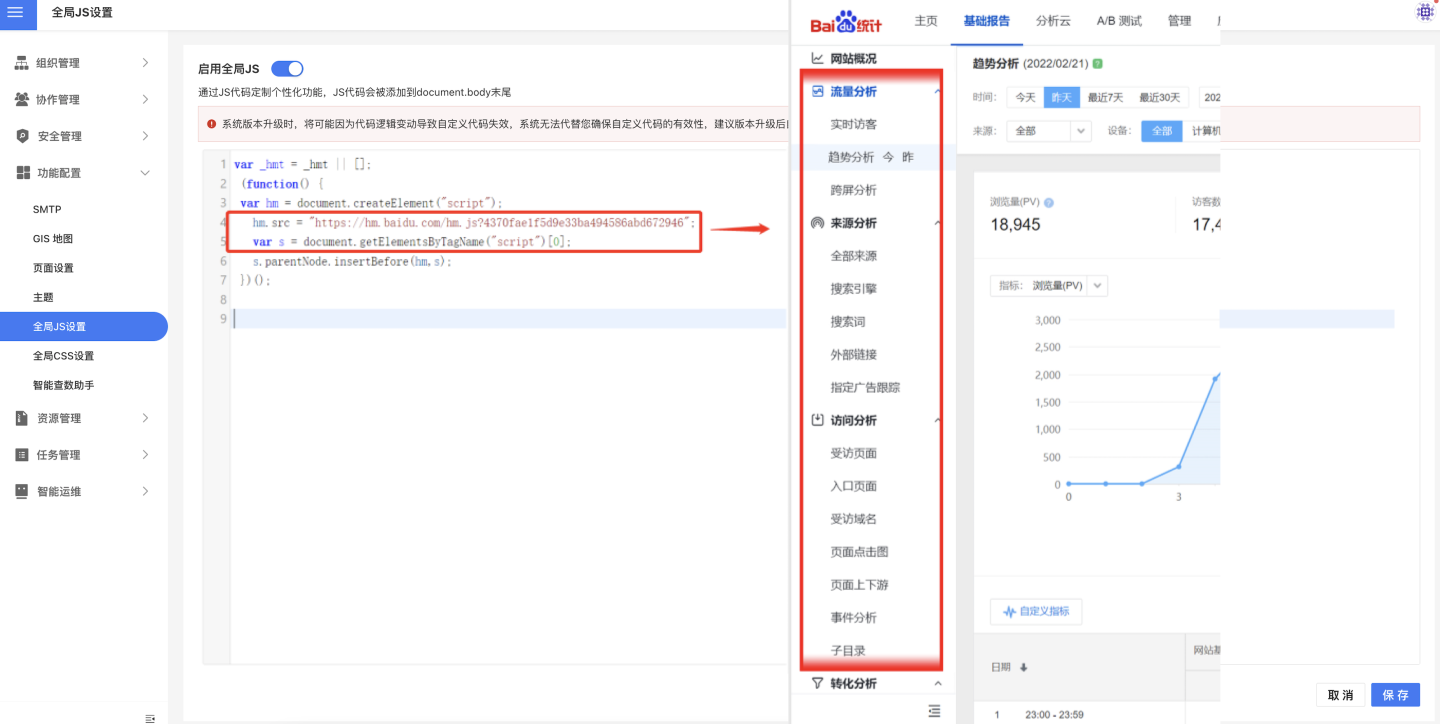
Example: integrating Baidu Analytics
Below is an example that uses JavaScript code to reference Baidu's website statistics to analyze the system. After enabling the JS feature, you can view the system's traffic analysis and website analysis data in the Baidu system.
Scenario 2: Modify Displayed Content After Rendering
This category covers page changes that use rendered elements, for example:
- Replace the default "no data" text on a chart with business-specific wording.
- Keep the browser tab title fixed to the customer company name.
- Hide a specific dropdown option only on certain pages.
- Customize breadcrumb text or titles on legacy pages.
Use window.customI18nPostProcessor for fixed copy. Use direct DOM manipulation when the page structure or render timing also matters.
In the following example, the no-data text of the chart in the system is replaced by custom JS code.
/**
 * Replace text
 */
var replaceTimer;
function replace(element, from, to) {
    const cont = element.textContent;
    if (cont) element.textContent = cont.replace(from, to);
};
function setTimer() {
  if (!window.location.pathname.includes('dashboard')) return;
  clearInterval(replaceTimer);
  replaceTimer = setInterval(function () {
    var elements = document.querySelectorAll('.hst__chart__no__data hr ~ span');
    var len = elements.length;
    console.log('In timer');
    while (len--) {
      replace(
        elements[len],
        new RegExp("Chart has no data that meets the conditions", "g"),
        "No data available",
      );
    }
  }, 300);
}
document.addEventListener('hs_urlchange', setTimer);
setTimer();Scenario 3: Customize UI Copy by i18n Key
If you only need to override a specific copy string, prefer window.customI18nPostProcessor. It is more stable and easier to maintain than polling the DOM for button labels or prompts.
window.customI18nPostProcessor = function (value, key, options) {
  if (key === 'operations.save') {
    return 'Save changes';
  }
  return value;
};Typical needs:
- Use presentation settings for Data Agent welcome text.
- Override built-in button labels, empty-state copy, or prompts.
- Apply tenant-level branding so each customer sees its own wording.
Recommendations:
- Return a new value for the keys you want to override; return
valuefor other keys. - Confirm the key first through the browser developer tools or the existing language pack before writing logic.
- If the copy depends on the page structure or render timing, use global JS instead of forcing it into this hook.
Data Agent customization boundary
In 7.0, Global JS customizes pages. Use WELCOME_MESSAGE in presentation settings for welcome text and Runtime Skills for industry rules and tool guidance. Data Agent runtime follows the platform's data and resource permissions.
Recover Global JS Configuration
Custom JS is powerful. Validate scripts in a test environment before applying them to production.
To address this, we have provided the ability to recover from runaway JS code using URL parameters. You can visit https://{host}/setting/global-js?no-global-js=true to disable JS code and access the configuration page, allowing you to regain access to the system.