

API 数据源
当用户使用 EXT API 数据时,可以通过 API 数据源将数据接入到衡石系统。 API 数据源定义统一的数据接入规范,能支持大量的无数据计算能力的 API 数据源。内置多种 API 数据源的同时支持用户自定义开发方式加入企业内部 API 数据源或其他公有 API 数据源,快速读取 API 数据源。API 数据源轻松实现接入外部 API 数据由1到 N 的快速增长,增强衡石数据的整合能力。
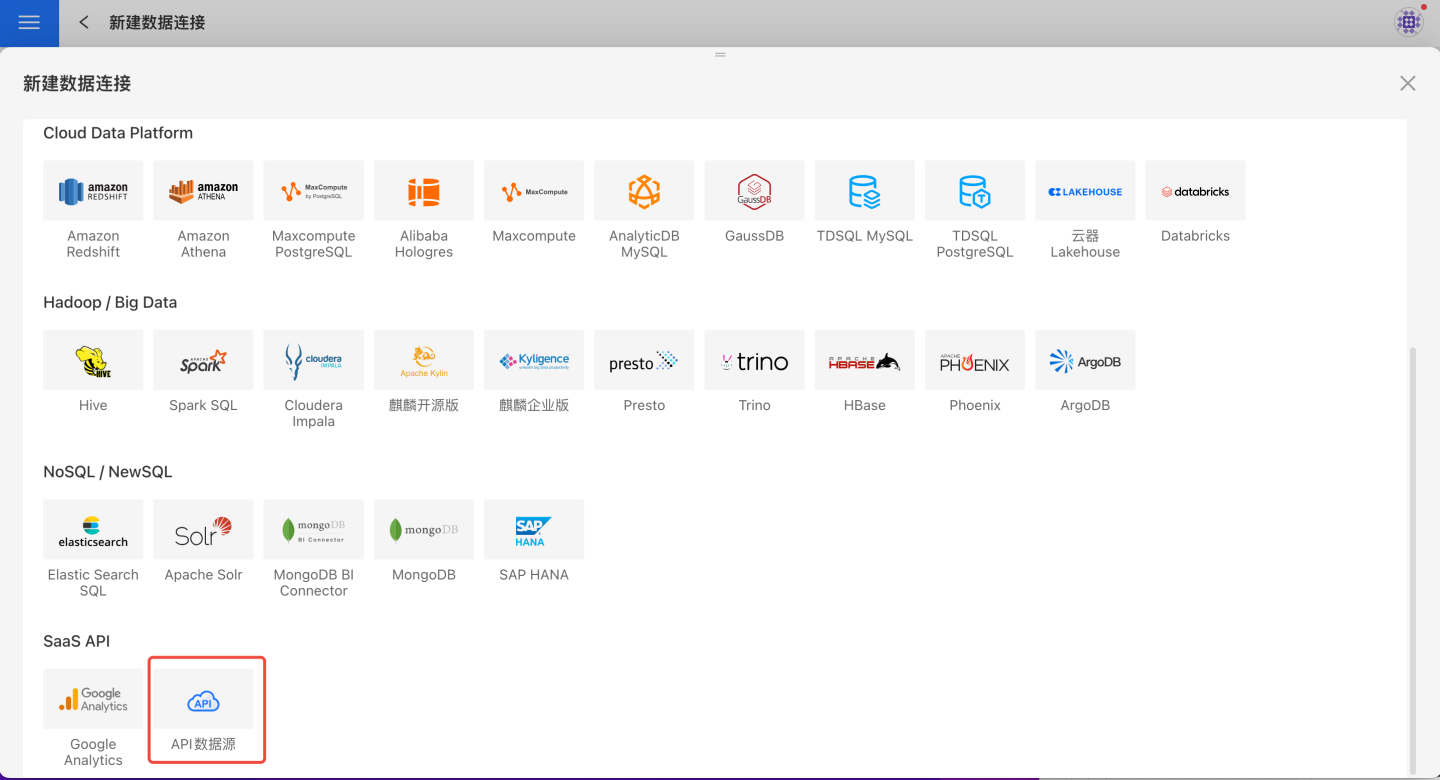
内置 API 数据源
明道云数据源
用户在明道云上的应用数据通过简单的配置就可以连接到衡石系统。配置步骤如下:
在新建数据连接中选择 API 数据源。
输入新建连接名称,API name 选择
mingdaoyun。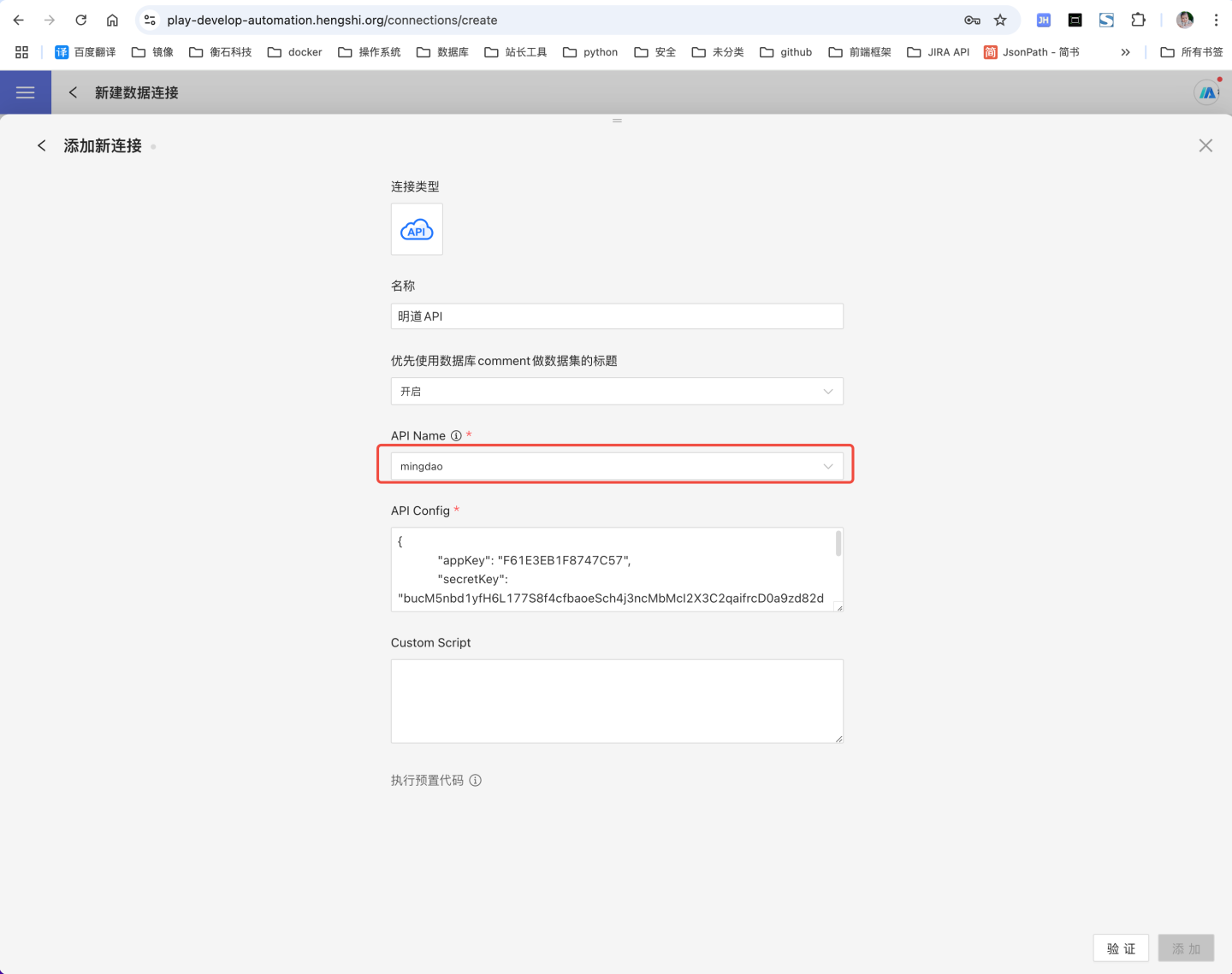
填写明道云配置信息 API Config,示例如下:
json{ "appKey":"ab1axxxxxxxx", "secretKey":"68b7eqbp7r1p5ZeAbw60aXcG0h8Gxxxxxxxxxxxxxxxxxxxxxxxxxxxxxxxxxxxxxxxxxxxxx", "sign":"NWRiODkxZmQ0NzljNzcxZDhiMDZjMzE5ZDxxxxxxxxxxxxxxxxxxxxxxxxxxxxxxxxxxxxxxxxxxxxxxx", "apiUrl": "https://api.mingdao.com/v2/open" }明道云 API Config 配置说明
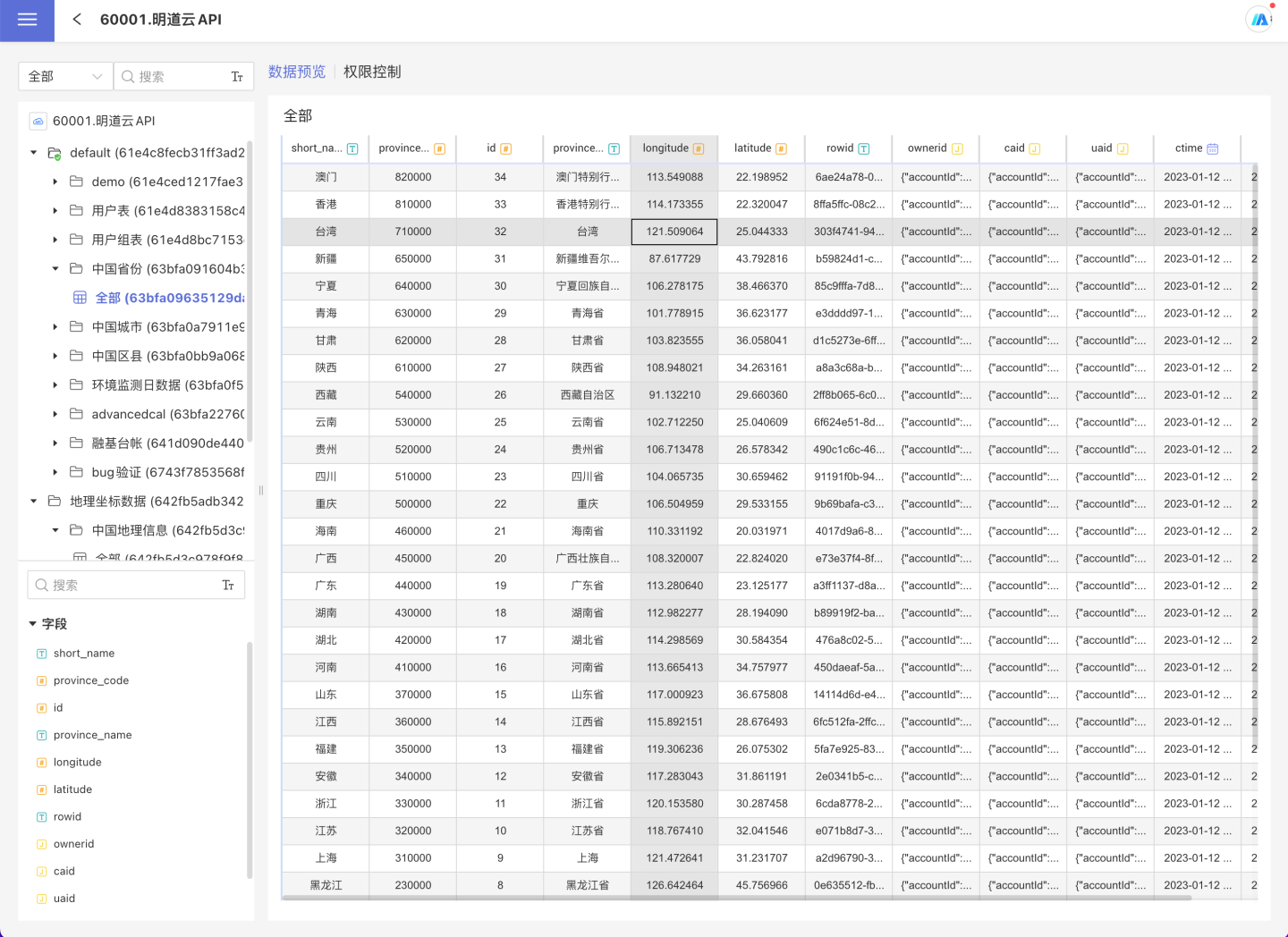
字段 是否必填 取值说明 appKey 是 明道云应用中的 AppKey secretKey 是 明道云应用中的 secretKey sign 是 明道云应用中的 sign apiUrl 否 明道云为私有部署时,apiUrl 请填写私有部署地址;公有部署时 apiUrl 可置空或填写明道云公有地址 验证成功后,点击保存,数据连接创建完成。在系统中可以查看和使用明道云中的数据。
FTP 数据源
系统支持 FTP 数据源,在 HENGSHI SENSE 中通过简单配置,可以读取 ftp 指定路径下的文件。 配置步骤如下。
在新建数据连接中选择 API 数据源。
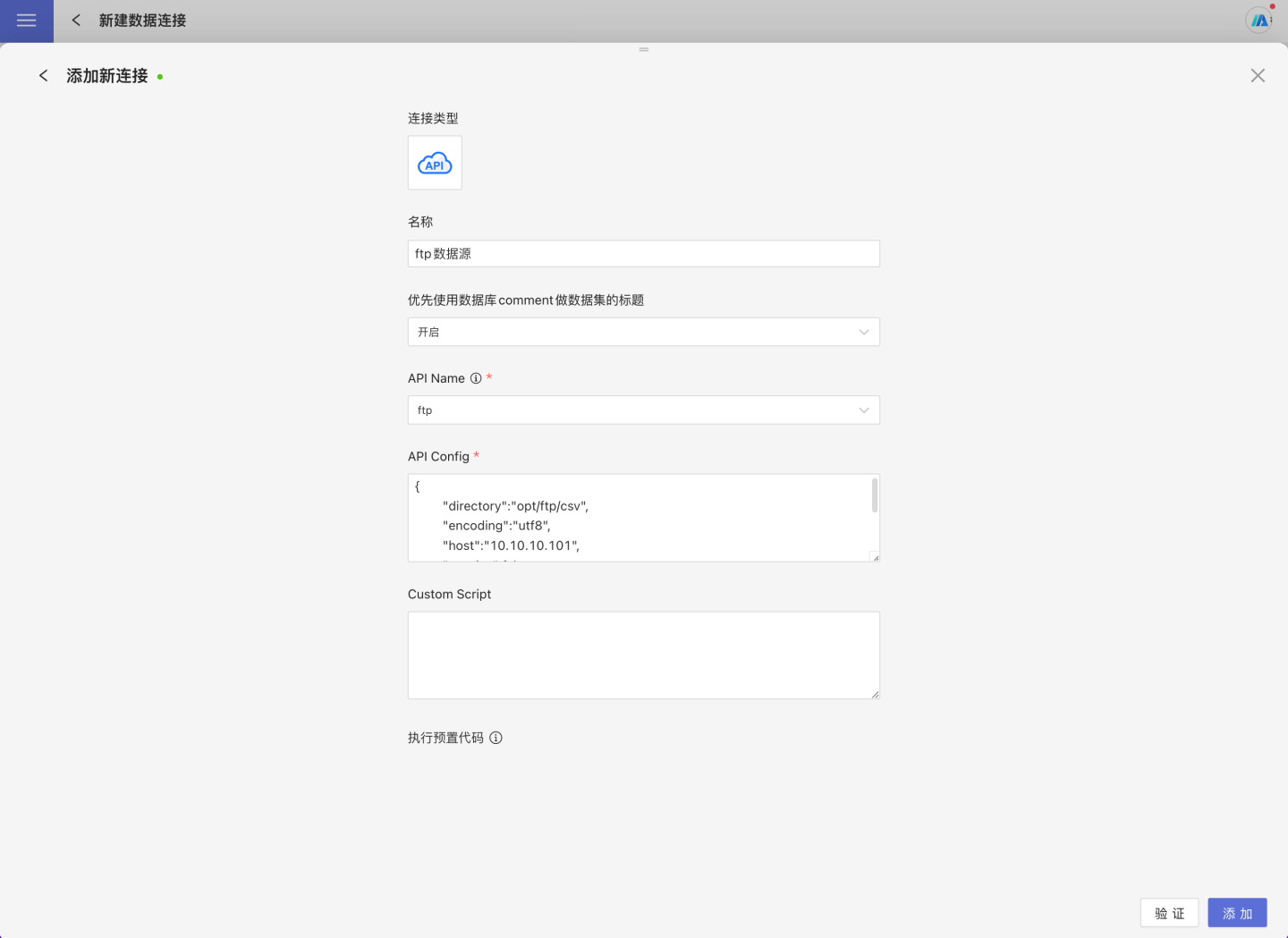
输入新建连接名称、,API name 选择
ftp填写FTP的 API Config配置信息,示例如下:
json{ "host":"10.10.x.y", "username":"xxxxxxx", "password":"xxxxxxx", "directory":"/opt/ftp", "encoding":"utf8", "passive":true, }FTP数据源的 API Config 配置说明
字段 是否必填 取值说明 host 是 ftp服务器的地址 username 是 ftp登录名 password 是 ftp登录密码 directory 否 ftp映射目录 encoding 否 编码 passive 否 验证成功后,点击保存,数据连接创建完成。在系统中可以查看和使用连接数据。
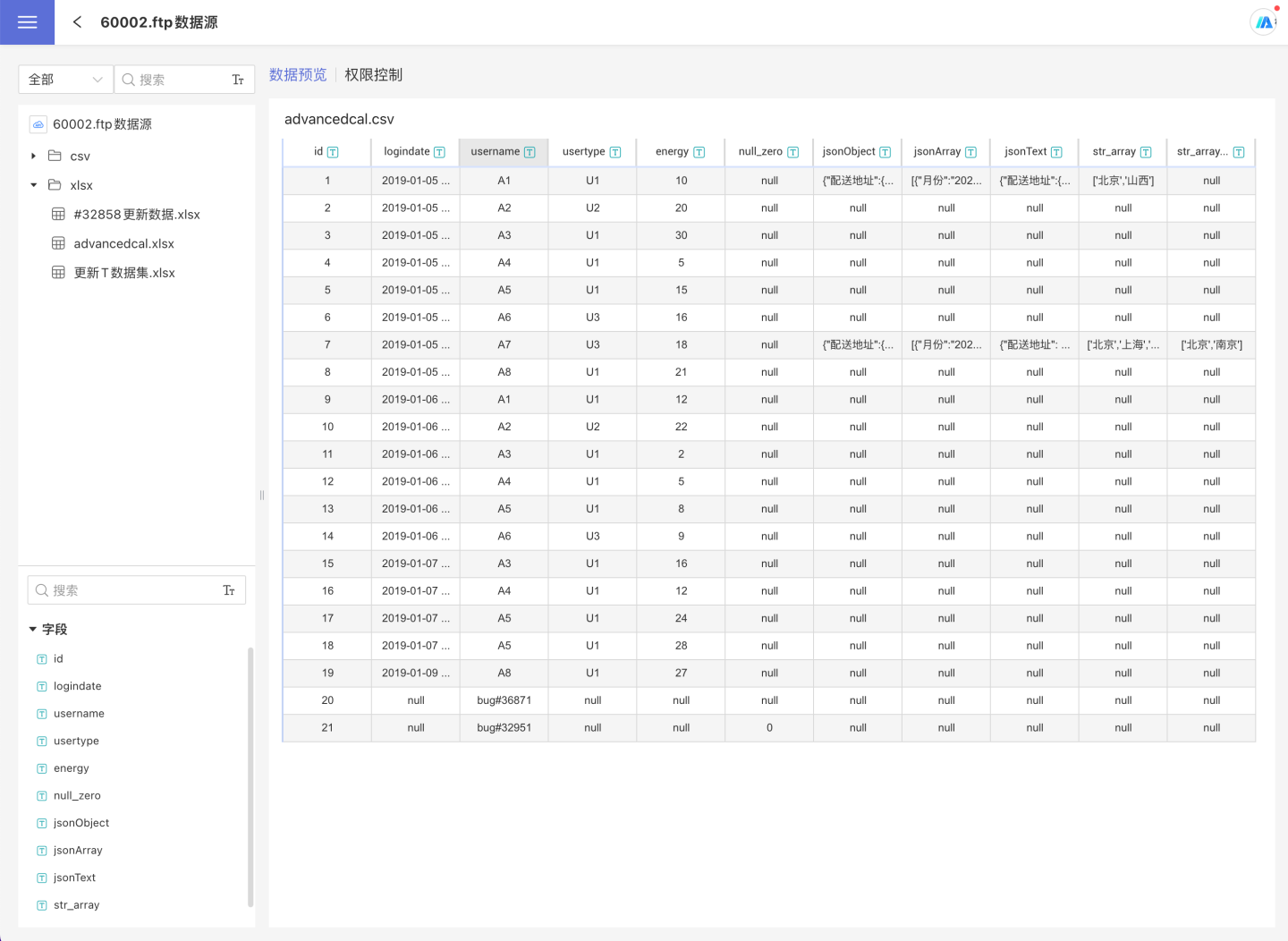
提示
FTP 数据源只能将 csv 和 excel 解析为表的形式,其他类型的文件不支持解析。
FTP数据源中, excel格式的只能在新建数据集后预览数据,不支持直接在 数据连接 中预览。
其他内置数据源
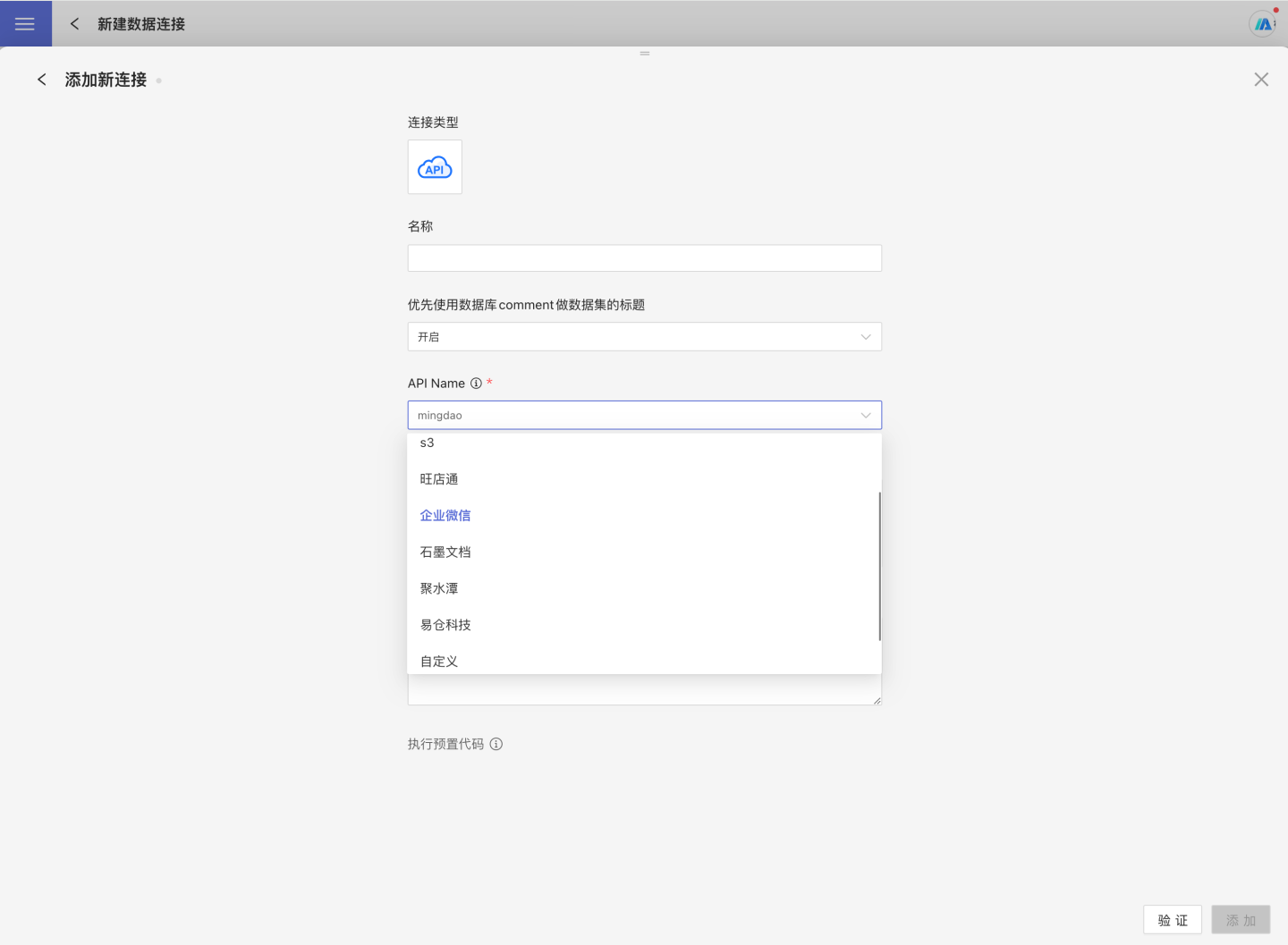
除了上述 FTP 和明道云外,系统还支持 S3、旺店通、企业微信、石墨文档、聚水潭、易仓科技、Wai Qin等 API 数据源,用户配置 API config 后,即可将数据接入到衡石系统中。
API Config配置示例
下面是支持的几个内置API数据源的 API Config的配置示例:
S3数据源的API Config
{
    "access_key_id": "AKIAWBC5HCDHELXXXXXXXX",
    "secret_key_id": "67U4ZvclZxkqiM9owAVTEootwyxxxxxxxx",
    "region": "cn-north-x",
    "useVirtualFolderDelimiter": false,
    "bucket": "",
    "path": ""
}旺店通 数据源的API Config
{
    "appsecret": "3a5737fc6bc2d6970f790308xxxxxxxx",
    "sid": "xxxxxxxx",
    "appkey": "xxxxxxxx-ot",
    "env": "production",
    "customizedStartTime": "2022-01-01 00:00:00",
    "addHSTimeColumn": true,
    "tableConfig": {
        "/stockin_order_query.php": {
            "timeWindow": 60,
            "timeWindowLimit": 50
        }
    }
}企业微信 数据源的API Config
{
    "corpid": "wwcXXXXXXXXXX",
    "corpsecret": "XGGBxxxxxxxxxxxxxxxxxxxxxxxx",
    "customizedStartTime": "2022-09-01 00:00:00",
    "addHSTimeColumn": false,
    "templates": [
        "ZLyhvnbAYmJnwLXyyxxxxxxxxxxxxxxxxxxxx1",
        "ZLyhvnbAYmJnwLXyyxxxxxxxxxxxxxxxxxxxx2"
    ]
}石墨 数据源的API Config
{
    "sid": "s%3A7db3e9d7bab34969a6d592xxxxxxxxxxxx.hnmK3aq2yOYYJB9exxxxxxx",
    "addHSTimeColumn": true,
    "customCacheMaxLifetime": 5
}聚水潭 数据源的API Config
{
    "app_key": "b0b7d1db226d4216xxxxxxxxxxxxxxxx",
    "app_secret": "99c4cef262f34ca88xxxxxxxxxxxx",
    "access_token": "b7e3b1e24e174593xxxxxxxxxxx",
    "env": "test",
    "customizedStartTime": "2022-11-15 00:00:00",
    "addHSTimeColumn": true,
    "tableConfig": {
        "/open/orders/single/query": {
            "timeWindow": 30,
            "timeWindowLimit": 3
        }
    }
}易仓科技 数据源的API Config
{
    "app_key": "e4bd91dcxxxxxxxx",
    "service_id": "xxxxxxxx",
    "secret_key": "bab4d5xxxxxxxx"
}Wai Qin 数据源的API Config
{
   "openId": "76776371xxxxxxxx",
   "appKey": "u7To2bdLxxxxxxxx",
   "customFormList": [
       "74842108646xxxxxxxx1",
       "74842108646xxxxxxxx2"
   ],
   "aiProductIdentificationResultQueryStartTime": "2025-01-01 00:00:00"
}指标API数据源
指标API数据源把第三方指标平台接入 HENGSHI SENSE,供动态主题域读取指标和维度,并在应用仪表盘中查询指标数据。该连接不提供数据库表目录,也不能用于创建普通数据集。
创建指标API数据源
- 进入
数据连接,点击新建数据连接,选择指标API数据源。 - 输入连接名称。如果 Groovy 脚本需要连接参数,在
API Config中填写第三方平台地址、接口路径和认证信息;脚本不需要配置时可留空或填写{}。 - 将适配第三方平台的 Groovy 脚本填入
Custom Script。 - 点击
验证。验证通过后保存连接。 - 如需将连接提供给其他用户,在连接的三点菜单中配置
指标查看权限。
注意
页面填写 Groovy 脚本需要先启用 ENABLE_GROOVY_SCRIPT,并重启服务使配置生效。服务器通过 EXT_API_PATH 管理的脚本不受该开关影响。脚本会执行外部 HTTP 请求,应限制目标地址、校验证书,并避免在日志中输出认证信息和完整响应。
API Config由 Groovy 脚本解析,字段可以按第三方平台的接口约定调整。下面是一个不含真实地址和凭据的示例:
{
  "baseUrl": "https://metrics.example.com",
  "metricsPath": "/api/metrics",
  "analysisContextPath": "/api/metrics/context",
  "dataPath": "/api/metrics/query",
  "token": "<metric-platform-token>"
}请勿将真实凭据写入共享文档、脚本注释或调试日志。
Groovy 脚本接口
指标API数据源使用独立的脚本接口,不使用普通自定义 API 数据源的 getApiName、getPathTables 和 fetchTableData。脚本按需实现以下方法:
| 方法 | 用途 |
|---|---|
setOptions(String) | 解析API Config |
fetchMetrics() / fetchMetrics(JSONObject) | 获取指标和维度列表 |
fetchMetricsPage(JSONObject) | 获取带分页总数的指标和维度列表 |
queryMeasureAnalysisContext(JSONObject) | 返回候选指标、兼容指标和可分析维度 |
buildChartRequest(options) | 将图表配置转换为第三方平台的查询请求 |
fetchData(JSONObject) | 返回图表字段结构和数据行 |
fetchFunctions() | 返回第三方平台支持的计算函数,可省略 |
testConnection() | 验证地址、认证和指标接口,可省略;省略时系统调用fetchMetrics()验证 |
下面的脱敏示例假设第三方接口返回统一的 data 对象:指标列表使用 metrics、dimensions 和 total,分析上下文使用 candidateMetrics、metrics、unionDims 和 dims,查数结果使用 schema、rows 和 total。实际字段不同时,请在脚本中完成映射。
import com.alibaba.fastjson.JSON
import com.alibaba.fastjson.JSONArray
import com.alibaba.fastjson.JSONObject
import com.hengshi.nangaparbat.dto.PageDto
import com.hengshi.nangaparbat.model.DatasetField
import com.hengshi.nangaparbat.model.Type

import java.net.HttpURLConnection
import java.net.URL

class MetricApiProviderExample {
    private JSONObject config = new JSONObject()

    def setOptions(String optionsText) {
        config = JSON.parseObject(optionsText ?: "{}") ?: new JSONObject()
    }

    def fetchMetrics() {
        return fetchMetricsPage(null).data
    }

    def fetchMetrics(JSONObject request) {
        return fetchMetricsPage(request).data
    }

    def fetchMetricsPage(JSONObject request) {
        JSONObject data = responseData(postJson(
                config.getString("metricsPath") ?: "/api/metrics",
                request ?: new JSONObject()))

        def fields = []
        fields.addAll(toFields(data.getJSONArray("metrics"), DatasetField.CategoryEnum.measure))
        fields.addAll(toFields(data.getJSONArray("dimensions"), DatasetField.CategoryEnum.field))

        PageDto page = new PageDto()
        page.setData(fields)
        Long total = data.getLong("total")
        page.setTotalHits(total == null ? fields.size() : total)
        return page
    }

    def queryMeasureAnalysisContext(JSONObject request) {
        JSONObject data = responseData(postJson(
                config.getString("analysisContextPath") ?: "/api/metrics/context",
                request ?: new JSONObject()))

        return [
                candidateMeasures : toFieldMaps(data.getJSONArray("candidateMetrics"), "measure"),
                compatibleMeasures: toFieldMaps(data.getJSONArray("metrics"), "measure"),
                unionFields       : toFieldMaps(data.getJSONArray("unionDims"), "field"),
                intersectionFields: toFieldMaps(data.getJSONArray("dims"), "field")
        ]
    }

    def buildChartRequest(options) {
        // 第三方字段不同时,在此处转换维度、指标、过滤、排序和分页。
        return JSON.parseObject(JSON.toJSONString(options ?: [:]))
    }

    def fetchData(JSONObject request) {
        JSONObject data = responseData(postJson(
                config.getString("dataPath") ?: "/api/metrics/query",
                request ?: new JSONObject()))

        return JSON.toJSONString([
                schema   : toFieldMaps(data.getJSONArray("schema"), null),
                data     : data.getJSONArray("rows") ?: [],
                totalHits: data.getLong("total")
        ])
    }

    def fetchFunctions() {
        return ["sum", "avg", "countDistinct"]
    }

    def testConnection() {
        return fetchMetrics() != null
    }

    private JSONObject postJson(String path, Object body) {
        String baseUrl = config.getString("baseUrl")
        if (!baseUrl) {
            throw new IllegalArgumentException("baseUrl is required")
        }

        String url = baseUrl.replaceAll('/+$', '') + '/' + path.replaceAll('^/+', '')
        HttpURLConnection connection = (HttpURLConnection) new URL(url).openConnection()
        connection.setRequestMethod("POST")
        connection.setDoOutput(true)
        connection.setConnectTimeout(30000)
        connection.setReadTimeout(30000)
        connection.setRequestProperty("Content-Type", "application/json;charset=UTF-8")
        connection.setRequestProperty("Accept", "application/json")

        String token = config.getString("token")
        if (token) {
            connection.setRequestProperty("Authorization", "Bearer " + token)
        }

        connection.outputStream.withCloseable { output ->
            output.write(JSON.toJSONString(body ?: [:]).getBytes("UTF-8"))
        }

        int responseCode = connection.getResponseCode()
        def stream = responseCode >= 400 ? connection.getErrorStream() : connection.getInputStream()
        String responseText = stream == null ? "" : stream.getText("UTF-8")
        connection.disconnect()

        if (responseCode >= 400) {
            throw new IllegalStateException("Metric API request failed: HTTP " + responseCode)
        }
        return JSON.parseObject(responseText)
    }

    private JSONObject responseData(JSONObject response) {
        return response?.getJSONObject("data") ?: response ?: new JSONObject()
    }

    private List<DatasetField> toFields(JSONArray items, DatasetField.CategoryEnum category) {
        return (items ?: []).collect { JSONObject item ->
            DatasetField field = new DatasetField()
            field.setFieldName(item.getString("code") ?: item.getString("fieldName"))
            field.setLabel(item.getString("name") ?: item.getString("label"))
            field.setCategory(category)
            field.setType(toType(item.getString("type")))
            return field
        }
    }

    private List<Map> toFieldMaps(JSONArray items, String category) {
        return (items ?: []).collect { JSONObject item ->
            def field = [
                    fieldName: item.getString("code") ?: item.getString("fieldName"),
                    label    : item.getString("name") ?: item.getString("label"),
                    type     : toType(item.getString("type")).name()
            ]
            if (category) {
                field.category = category
            }
            return field
        }
    }

    private Type.TypeName toType(String rawType) {
        switch ((rawType ?: "string").toLowerCase()) {
            case ["number", "integer", "long", "decimal", "double", "float"]:
                return Type.TypeName.number
            case ["date", "datetime", "timestamp", "time"]:
                return Type.TypeName.date
            case ["boolean", "bool"]:
                return Type.TypeName.bool
            case "json":
                return Type.TypeName.json
            default:
                return Type.TypeName.string
        }
    }
}自定义 API 数据源
注意
从 5.1 版本开始,为了安全性,系统默认关闭页面上填写的 Groovy 脚本功能。 如需使用自定义 API 数据源(通过页面填写 Groovy 脚本),需要在配置文件中添加:
ENABLE_GROOVY_SCRIPT=true配置完成后需重启服务生效。上传到服务器的 Groovy 脚本(通过 EXT_API_PATH 变量配置)不受影响。
除了内置的 API 数据源外,系统支持用户自定义 API 数据源,可以使用groovy脚本实现自定义 API 数据源。
- 在新建数据连接中选择 API 数据源。
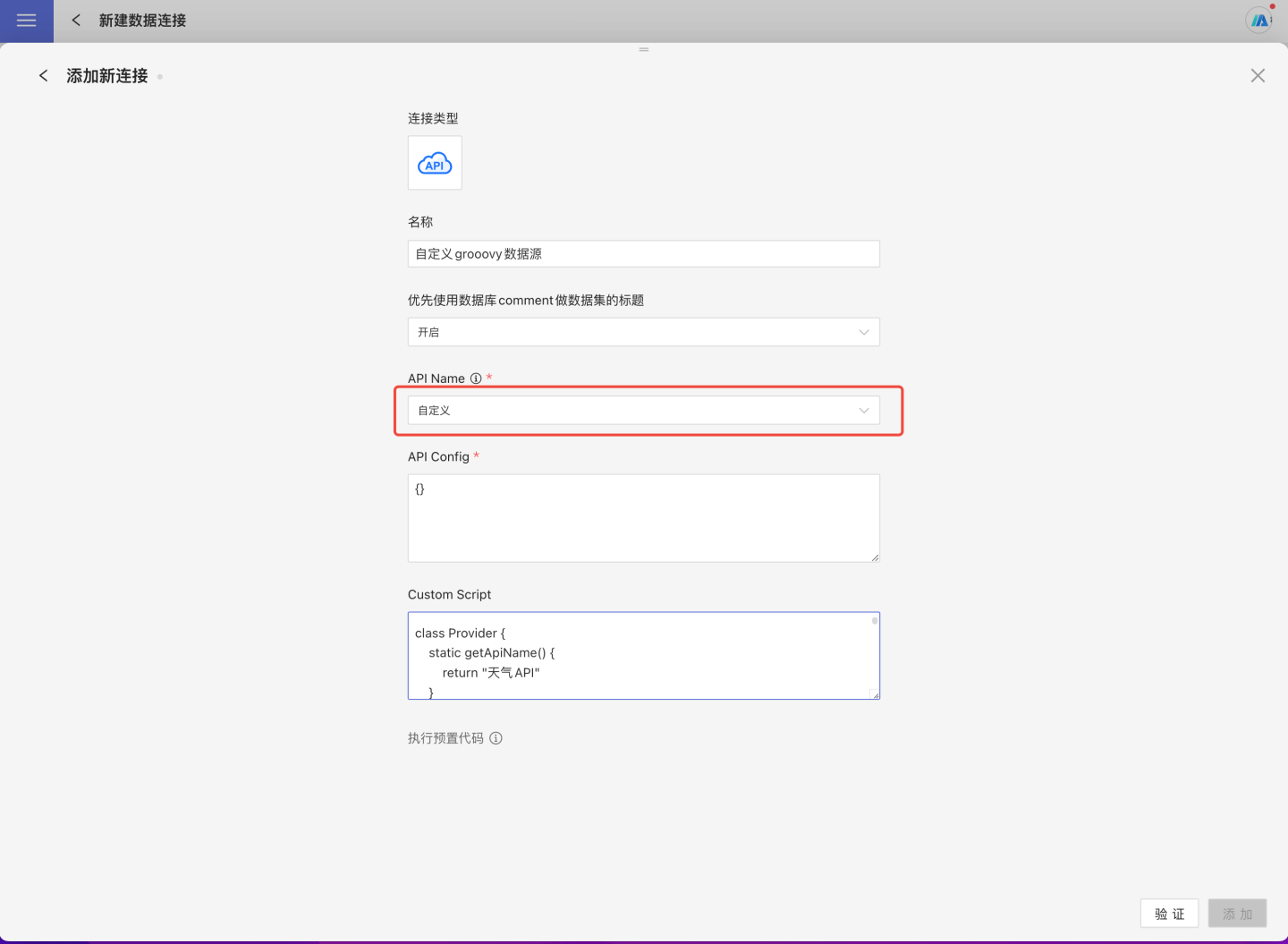
- 输入新建连接名称、,API name 选择
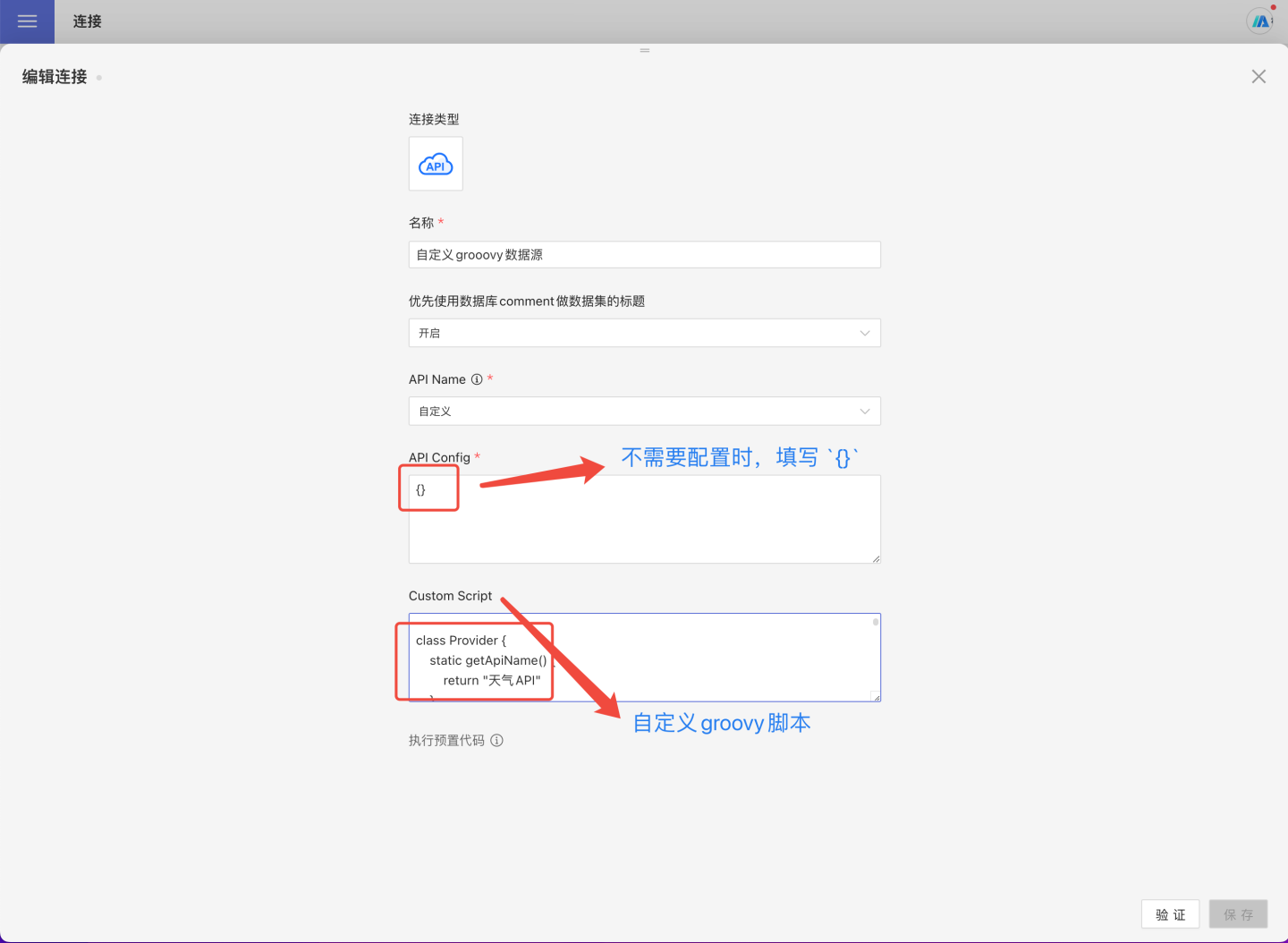
自定义 - 填写 API Config配置信息,注意: 这里的 配置信息需要在脚本中通过代码解析。不需要配置时,建议填空
{} - 按照规范编写自定义 API 数据源的 Groovy 脚本,放到
Custom Script
自定义API 数据源脚本规范
自定义数据源接入时,需要在 Groovy 脚本中实现下面四个接口。
- getAPIName : 用来获取 API 名称。
- setOptions:用来处理认证鉴权相关配置信息。
- fetchPathTables:用户获取数据源目录结构。
- fetchTableData : 用于获取 table 节点数据。
函数 getAPIName
函数 getAPIName 的作用是输出 API 名称。 每一个 API 数据源名称不能相同,如果相同会导致发生冲突。 该函数是类 static 函数,返回值为 string 类型的字符串。
		static getApiName() {
        return "TrivalApiDemo"
}函数 setOptions
函数 setOptions 的作用是用来保存处理认证鉴权相关的配置信息。 如果不涉及外部网络请求,可以直接留空了。 该函数是 object 函数, 函数参数是一个 JSON 字符串,这个字符串是用户在添加数据连接时填写的信息。
    def setOptions(String options) {
        if (!options?.trim()) {
            return
        }
        def json = jsonSlurper.parseText(options)
        if (json.cityCodeURL?.trim()) {
            config.cityCodeURL = JSON.cityCodeURL
        }
        if (json.weatherURL?.trim()) {
            config.weatherURL = JSON.weatherURL
        }
}函数 getPathTables
函数 getPathTables 的作用是返回目录树,把该数据源的所有 catalog/schema/table 的结构都返回。 代码示例如下。
  def getPathTables() {
      def tableTree = [
           [ pathType: "table", name: "table1", tableType: "table"],
           [ pathType: "path", name: "schema2",
              children: [
                  [ pathType: "table", name: "table3", tableType: "view"],
                  [ pathType: "table", name: "table4", tableType: "table", remarks: "表别名4"]
              ]
          ]
      ]
      return new JsonBuilder(tableTree).toString()
}结构定义说明:
- pathType 的种类有 table(代表叶子结点的表), path(代表数据库中的 schema 或者 catalog)
- name 就是 表名或者 schema/catalog 的名字
- tableType 只对 table 有意义,它的类型一般写成 table 就可以了(另外一个选项是 view,不常用)
- 当 pathType 为 path 时,代表这个节点不是一个表,而是一个 schema 或者 catalog 这样的中间目录结构,此时它可以有 children 数组节点
- remarks 是当前节点的一个说明,需要的时候可以提供,是可选项。
通过上面的函数定义的 schema, 可以在数据连接中获取 table。
函数 fetchTableData
函数 fetchTableData 函数的作用是获取一个叶子节点,即 table 节点的数据。代码示例如下。
  def fetchTableData(List<String> tablePath) {
      def tableName = tablePath.last()
      def schemaData = [
          schema: [
              [fieldName: "field1", label: "字段别名1", type: "string"],
              [fieldName: "field2", label: null, type: "string"],
              [fieldName: "field3", type: "number"],
              [fieldName: "field4", type: "date"],
              [fieldName: "field5", type: "time"]],
          data: [
              ["a", "b", 10, "2022-01-01", "2022-01-01 23:59:59"],
              ["c", "d", 20.20, "2019-12-39", "2019-12-39 23:59:59"]
          ]
        ]
      return new JsonBuilder(schemaData).toString()
}Schema 结构定义:
- fieldName 字段名,需要在 table 内具有唯一性,能区分不同的字段。
- type:字段的类型,常用的类型有:string, number, date, time, json, bool。
- label:字段的别名。
Data 结构定义:
- data 的每一个元素都是一个数组,数组的元素个数必须和 schema 相同,数据的类型也必须一一匹配。
自定义API 数据源代码示例
下面使用 Java 构造一个天气 API 自定义数据源。weather.groovy 文件定义内容如下:
//Weather.groovy
import com.hengshi.nangaparbat.dto.DatasetResultDto
import com.hengshi.nangaparbat.model.PathTableNode
import static com.hengshi.nangaparbat.model.Dataset.Field
import static com.hengshi.nangaparbat.model.Type.TypeName
import groovy.json.JsonSlurper

class Provider {
    static getApiName() {
        return "天气 API"
    }

    def setOptions(String options) {
        if (!options?.trim()) {
            return
        }
        def json = jsonSlurper.parseText(options)
        if (json.cityCodeURL?.trim()) {
            config.cityCodeURL = json.cityCodeURL
        }
        if (json.weatherURL?.trim()) {
            config.weatherURL = json.weatherURL
        }
    }

    def getPathTables() {
        def txt = config.cityCodeURL.toURL().text
        def arr = jsonSlurper.parseText(txt)
        return arr.collect{ obj ->
            def node = PathTableNode.createTableNode(obj.city_code)
            node.setRemarks(obj.city_name)
            return node
        }
    }

    def fetchTableData(List<String> tablePath) {
        def url = config.weatherURL + tablePath.last()
        def txt = url.toURL().text;
        def result = new DatasetResultDto()
        def schema = []
        def data = []
        def row = []
        def arr = jsonSlurper.parseText(txt)
        arr.data.each{ k, v ->
            def field = new Field();
            field.setFieldName(k)
            field.setType(TypeName.string)
            if (k.startsWith("pm")) {
                field.setType(TypeName.integer)
            }
            schema.add(field)
            row.add(v);
        }
        result.setSchema(schema)
        data.add(row)
        result.setData(data)
        return result
    }

    def jsonSlurper = new JsonSlurper()

    def config = [
        cityCodeURL: "https://github.com/baichengzhou/weather.api/raw/master/src/main/resources/citycode-2019-08-23.json",
        weatherURL: "http://t.weather.itboy.net/api/weather/city/"
    ]
}代码说明:
- DatasetResultDto 定义了 fetchTableData 的返回结果,它由 schema 和 data 组成,通过 setData 和 setSchema 来写入。
- PathTableNode 定义了 getPathTables 的返回,它由 pathType, name, children 和 tableType 组成,也是通过各自的 setter 来写入
- schema 由多个 Field 组成,Field 由 fieldName, type 和 label 组成。
- type 的种类是一个枚举类型定义的 TypeName。
- CityCode中定义了目录结构。
- 天气网站是天气数据来源,记录了各个城市的天气数据。